
Dashboard Subscriptions
The Subscriptions Dashboard in SegMetrics gives you a clear, revenue-focused view of your recurring customers. It shows how many active subscriptions you have, how they’re trending over time, and how much recurring revenue they’re generating.
Inside this dashboard, you can:
- Track MRR, ARR, and subscription growth
- Monitor new subscriptions, churn, and reactivations
- See revenue by plan, product, or segment
- Identify which channels and campaigns drive recurring revenue
- Analyze customer behavior across the full lifecycle — from first touch to long-term retention
Instead of just seeing signups, the Subscriptions Dashboard connects your marketing efforts directly to subscription revenue, helping you understand what drives sustainable, recurring growth.
Accessing the Subscriptions Dashboard
- Log in to your SegMetrics account.
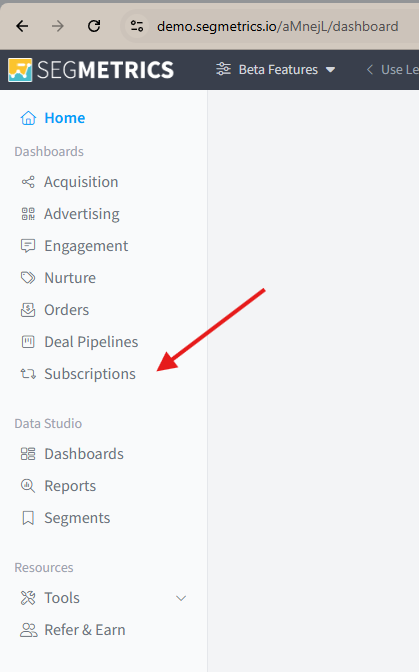
- From the left-hand menu, click Subscriptions.
- You’ll be taken to the Subscriptions Dashboard, where you can run MRR (Monthly Recurring Revenue) reports and analyze recurring revenue trends.
Using Filters to Customize Your Report
To refine your data:
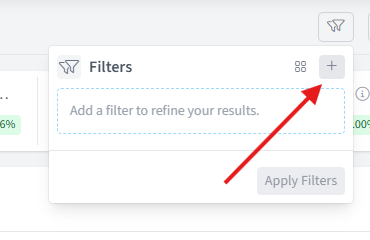
- Click the Filter button.

- Click on the '+' symbol to add a filter:
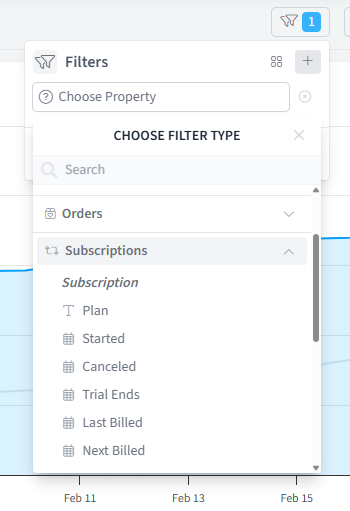
- Select from common filtering options such as:
- Plan Name
- Started Date
- Canceled Date
- Other subscription-related criteria
Frequently Asked Questions:
Q1: What metrics can I track in the SegMetrics Subscriptions Dashboard? The Subscriptions Dashboard lets you track MRR, ARR, subscription growth, new subscriptions, churn, reactivations, and revenue broken down by plan, product, or segment. It also connects marketing channels and campaigns to recurring revenue so you can see what's driving sustainable growth.
Q2: How do I access the Subscriptions Dashboard? Log in to your SegMetrics account and click Subscriptions in the left-hand menu. This takes you directly to the dashboard where you can run MRR reports and analyze recurring revenue trends.
Q3: How is the Subscriptions Dashboard different from just viewing signups? Unlike a simple signups view, the Subscriptions Dashboard connects your marketing efforts directly to subscription revenue, giving you a full lifecycle view, from a customer's first touch all the way through to long-term retention. This helps you understand not just who signed up, but what's actually driving recurring revenue.
Q4: How do I filter data in the Subscriptions Dashboard? Click the Filter button, then click the + symbol to add a filter. You can filter by criteria such as Plan Name, Started Date, Canceled Date, and other subscription-related attributes to narrow down your report to the data most relevant to you.