
Klaviyo
SegMetrics gives you the ability to analyze your Klaviyo campaign performance and connect it to other data sources. With this integration, you can easily segment leads, identify automation triggers that convert to customers, understand where your most valuable leads come from, and track the complete customer journey from initial touchpoint to purchase.
Note: This integration provides tag dates, so SegMetrics can accurately record when each tag was applied to a contact.
Integration Overview
SegMetrics imports your contacts, custom fields, tags, orders and more directly from Klaviyo. The integration keeps your data up-to-date with the most recent information in your Klaviyo account, ensuring you always have access to the information you need for accurate reporting.
Key Benefits:
- Automatic sync of contacts, tags, and custom fields
- Historical order data import
- Real-time data updates
- Cross-platform attribution using email addresses
- Enhanced customer journey tracking
You don't need to import orders or tag people in any special way - they just need to exist in your Klaviyo account for SegMetrics to sync them automatically.
How to Connect Klaviyo to SegMetrics
Follow these steps to establish the connection between your Klaviyo and SegMetrics accounts:
Step 1: Access Integrations in SegMetrics
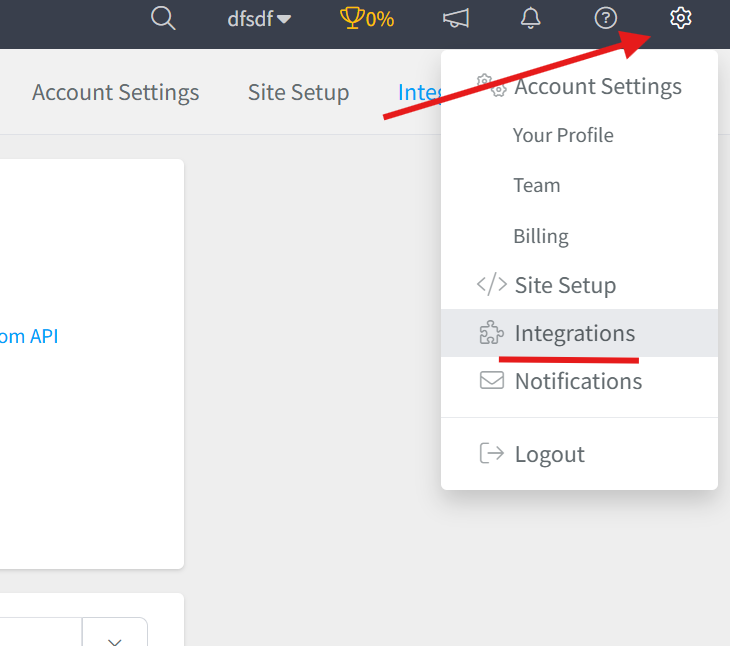
- Click on the gear icon in the top right corner of your SegMetrics dashboard
- Select "Integrations" from the dropdown menu
Step 2: Select Klaviyo Integration
- Once on the Integrations page, locate the CRM section
- Click "Connect" next to Klaviyo

Step 3: Enter Your Klaviyo API Key
- The Activation window will open, prompting you to enter your Klaviyo API Key
- To find your API Key in Klaviyo:
- Navigate to Account > Settings > API Keys
- Click "Create API Key"
- Copy the generated API key
- Paste the API key into the SegMetrics activation window
- Click "Connect" to complete the setup

Connecting Payment Information to Klaviyo Contacts
If You're Using Klaviyo's Native Payment Integrations
No additional setup is required - payment data integrates automatically with SegMetrics through the Klaviyo connection.
If You're Using External Payment Processors
If your payment processor doesn't connect with Klaviyo natively, SegMetrics can still connect this information using email addresses as the matching identifier. Simply integrate your payment processor directly with SegMetrics as well, and we'll match the data automatically.
Recommendation: Use whichever payment processor can serve as your single source of truth for the most accurate revenue attribution.
Historical Data Sync
When you first connect Klaviyo to SegMetrics, all historical data from your Klaviyo account syncs automatically. This includes:
- All existing contacts and their information
- Historical email campaigns and engagement data
- Past order data (if available in Klaviyo)
- Custom fields and tags
> Pro Tip: Once Klaviyo is connected and actively syncing, SegMetrics stores the collected data in our own database. This allows us to accumulate more data over time through continuous syncs, giving you access to increasingly comprehensive historical Klaviyo data for your reports.
Setting Up UTM Tracking for Email Links
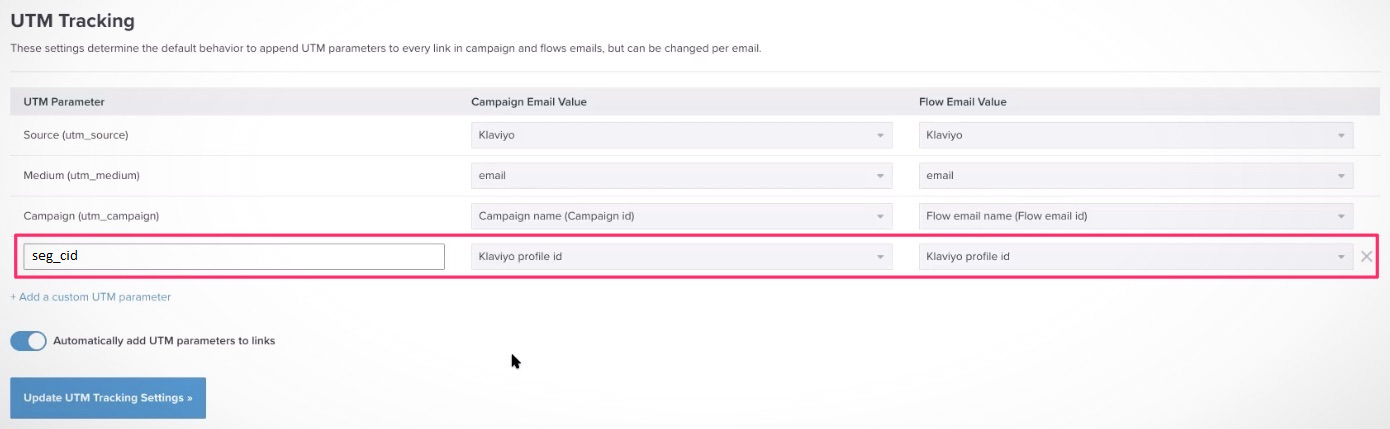
To get accurate click tracking from your Klaviyo emails, set up the seg_cid parameter:
Automatic UTM Setup (Recommended)
- In Klaviyo, navigate to Account Settings > UTM Tracking
- Access the default UTM builder
- Add a custom UTM parameter with these settings:
- UTM Parameter:
seg_cid - Campaign Email Value:
Klaviyo profile id - Flow Email Value:
Klaviyo profile id
Manual UTM Setup
If you prefer to add tracking manually to individual email links, use this structure:
seg_cid={{Klaviyo_profile_id}}
Example finished link: http://example.com/?seg_cid={{Klaviyo_profile_id}}
The seg_cid parameter allows SegMetrics to identify visitors across devices and sessions, providing more accurate attribution data.
Using Klaviyo Data in SegMetrics Reports
Once your Klaviyo data is synced, you can create targeted reports to analyze different aspects of your marketing performance. SegMetrics organizes reports by specific use cases to help you find the right insights quickly.
Report Types for Klaviyo Data
Acquisition Report - Use this report type for analyzing new lead metrics from your Klaviyo data, including lead sources and initial contact acquisition.
Nurture Report - Perfect for analyzing tags and list performance metrics. Track how different Klaviyo segments and tags contribute to your marketing goals.
Engagement Report - Focus on funnel page interactions and email engagement metrics. Analyze how your Klaviyo email campaigns drive website activity and conversions.
Orders Report - Track revenue metrics and purchasing behavior from contacts acquired through Klaviyo campaigns and sequences.
Subscriptions Report - Analyze subscription product performance for recurring revenue tracking when using Klaviyo with subscription-based products.
Each report type provides specific filters and metrics tailored to its purpose, making it easier to extract actionable insights from your Klaviyo integration data.
Frequently Asked Questions
Q: What timezone is Klaviyo data synced in?
A: Klaviyo data syncs in UTC. SegMetrics reports on your data based on the timezone you set in your Account Settings, automatically converting the data for accurate local time reporting.
Q: Do I need tracking links to get data from my Klaviyo account?
A: No, you don't need to create tracking links for SegMetrics to gather UTM data from your Klaviyo emails. However, tracking links provide additional detail about exactly which links visitors clicked for ads, email broadcasts, or campaigns, giving you more granular insights.
Q: Can I track client invoices and cart sales from Klaviyo?
A: Yes, SegMetrics uses the e-commerce data that comes through Klaviyo's integrations. For more detailed invoice tracking with multiple client touchpoints (sales calls, signups, invoices, payments), consider using SegMetrics funnel reports to map out each step of your client journey.
Q: How long does the initial sync take?
A: The initial sync time depends on the amount of historical data in your Klaviyo account. Most accounts sync within a few hours, though larger accounts with extensive historical data may take longer. You'll receive a notification once the sync is complete.
Q: What data gets synced from Klaviyo to SegMetrics?
A: SegMetrics syncs contacts, custom fields, tags, email engagement data, segments, orders (if available), and campaign performance data. All historical data is included in the initial sync, with ongoing updates happening in near real-time.