
Ontraport
SegMetrics integrates with Ontraport to help you analyze your campaign performance and connect it to other data sources. Segment your data into leads, find automation triggers that convert to customers, and understand where your most valuable leads are coming from.
Note: This integration does not provide tag dates. SegMetrics will record the date a tag was first seen rather than the date it was originally applied.
Integration Overview
SegMetrics connects the spend from your ad platforms and purchases from your payment processor to the email addresses in Ontraport. The integration automatically syncs contact information, custom fields, tags, and campaign data to provide comprehensive marketing attribution.
Key benefits include:
- Automatic contact and campaign data synchronization
- Email engagement tracking and attribution
- Integration with Ontraport's built-in payment processing
- Advanced segmentation based on contact behavior and tags
- Complete customer journey tracking from first touchpoint to purchase
You don't need to import orders or tag people in a special way - they just need to be in your Ontraport account.
How to Connect Ontraport to SegMetrics
Step 1: Access Integrations
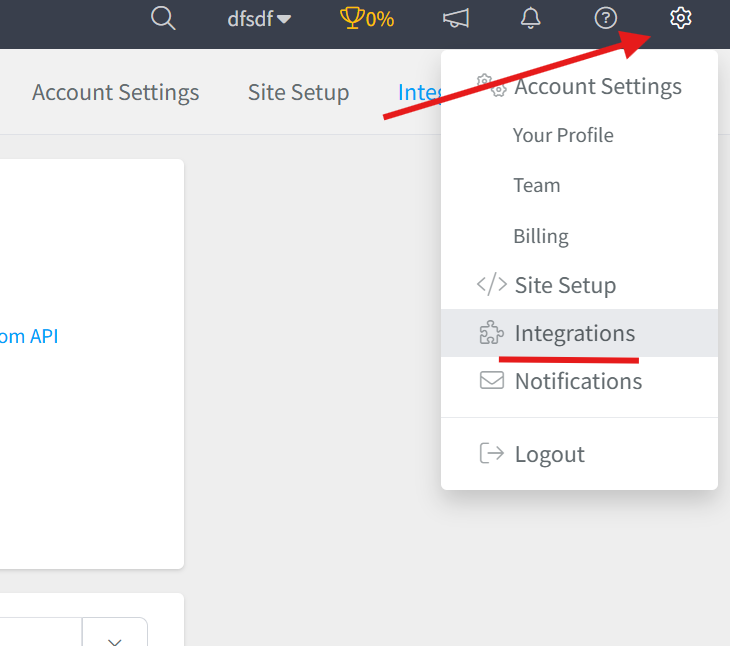
- Click the gear icon in the top right corner of SegMetrics
- Select "Integrations" from the menu
Step 2: Connect Ontraport
- On the Integrations page, locate the CRM section
- Find Ontraport and click "Connect"
- This will open the Activation window where you'll add your App ID and API Key

Step 3: Get Your Ontraport API Credentials
- Follow Ontraport's instructions to obtain your API key: https://support.ontraport.com/hc/en-us/articles/217882248-API-in-ONTRAPORT#how-to-obtain-an-api-key
- Copy your App ID and API Key from your Ontraport account
- Paste both credentials into the SegMetrics activation window
- Click "Save" to complete the connection

The integration will begin importing your Ontraport data automatically once connected.
Using SegMetrics Reports with Ontraport Data
Once connected, use these SegMetrics reports to analyze your Ontraport marketing data:
Acquisition Report → Track new lead acquisition metrics and performance of lead magnets and opt-in campaigns
Advertisement Report → This is for analyzing the effectiveness of your paid ads. This will show cost per lead, cost to acquire customer, and ROAS.
Nurture Report → Analyze email engagement through tags, sequences, and automation campaigns to understand nurture effectiveness
Engagement Report → Monitor email click-through rates, website visits from campaigns, and contact interaction patterns
Orders Report → Review revenue generated from email campaigns and identify highest-converting touchpoints using Ontraport's e-commerce data
Subscriptions Report → Track subscription-based revenue attributed to email marketing efforts and retention campaigns
Improving Email Tracking Fidelity
To enhance click tracking from Ontraport emails, add the contact email to your email links: http://example.com/?email=[Email]
This helps SegMetrics identify visitors even when they're on different devices.
Historical Data Sync
When you first connect Ontraport, all historical data from your account syncs automatically including contact information, email campaigns, tags, and engagement history. SegMetrics stores this data in its own database, enabling more comprehensive historical reporting as additional sync cycles accumulate data over time.
Pro Tip: Historical email data allows you to analyze past campaign performance, identify successful automation sequences, and understand long-term contact engagement patterns.
Frequently Asked Questions
Q: What timezone is Ontraport data synced in?
A: Ontraport data syncs in EST. SegMetrics displays reports based on the timezone set in your Account Settings.
Q: Do I need SegMetrics tracking links for Ontraport data?
A: No, you don't need tracking links to import Ontraport contact and campaign data. However, tracking links provide additional detail about specific email campaign performance and attribution.
Q: How do I connect payment information to Ontraport contacts?
A: If you're using Ontraport's payment integrations, payment data is integrated automatically. If you use an external payment processor, SegMetrics can integrate it separately, and we recommend using whichever processor can serve as your single source of truth.
Q: How can I create reports on client invoices and cart sales from Ontraport?
A: SegMetrics uses the e-commerce data from Ontraport's integrations. For invoice-based client reporting, consider using funnel reports where you can map out each step of your client process (sales call, signup, invoice, payment).
Q: How can I set up email links to get click rates from Ontraport emails?
A: Add the contact email to your links with "email=[Email]". The finished link should look like: http://example.com/?email=[Email]. This tells SegMetrics who is visiting the page, even on different devices.