
Square
SegMetrics gives you the ability to analyze your marketing campaign performance by connecting Square with other data sources. With that information, you can easily segment that data into your leads, find the automation triggers that convert to customers, understand where your most valuable leads are coming from, and more!
Note: This integration does not provide tag dates. SegMetrics will record the date a tag was first seen rather than the date it was originally applied.
Integration Overview
SegMetrics takes the spend from your ad platforms and purchases from Square then connects them to the email addresses in your CRM.
You don't need to import the orders or tag people in a special way: they just need to be in your Square and CRM!
How to Connect Square to SegMetrics
- Click on the gear icon in the top right corner and then click "Integrations"
- Once you're on the Integrations page, select the Payments list and click on Connect next to Square
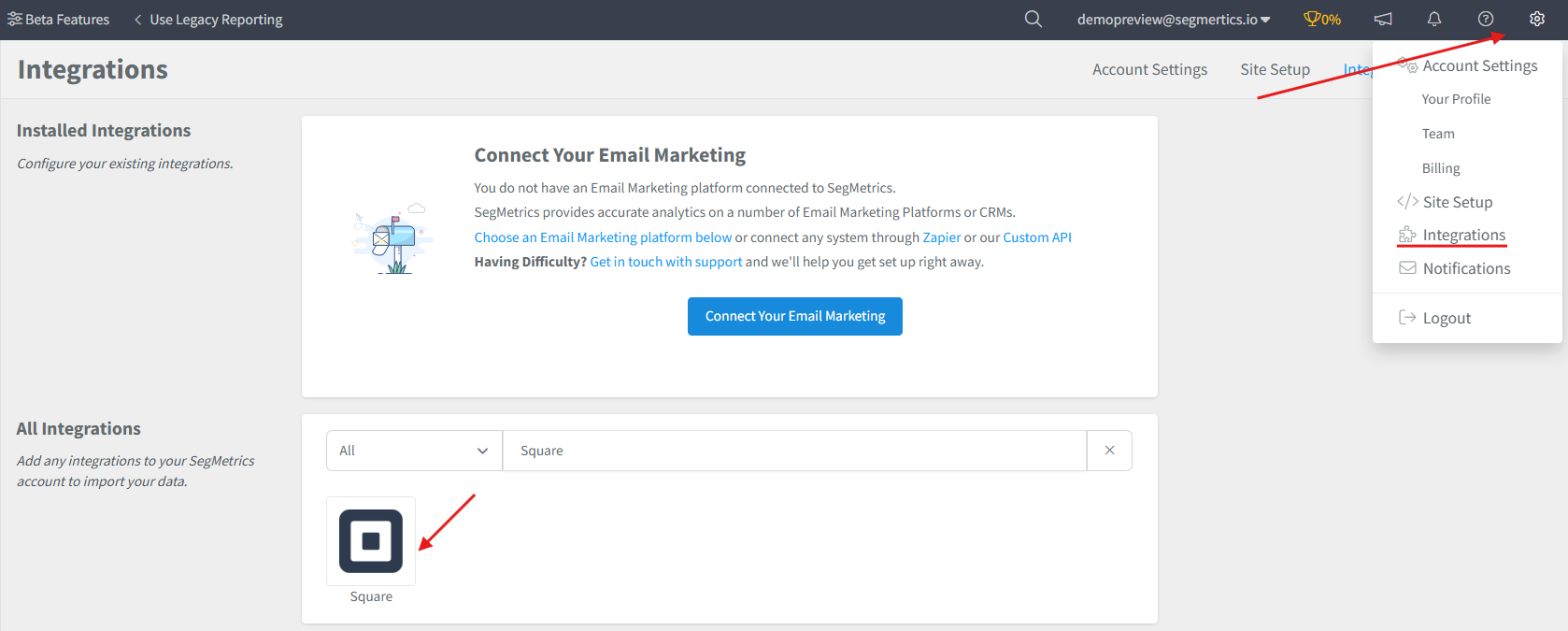
- This will open the Activation window, which is where you will be prompted to connect through OAuth to SegMetrics.
How to Connect Payment Information to CRM Contacts
There is nothing left to do: SegMetrics will match the email addresses in Square with those in your CRM and connect the payment data automatically.
However, if you have more than one payment processor, we recommend using whichever can act as the single source of truth.
When you connect a new Square data source, all historical data from your Square account is synced.
Pro Tip: Once Square is connected and actively syncing data, we store the data that's collected in our own database. This allows us to accumulate more data over time as more data syncs are made so that you can report on more historical Square data in your SegMetrics reports.
How to Use Square Data in SegMetrics Reports
Report Types Available:
- Acquisition Reports - NEW customers only
- Nurture Reports - customers who received tags/list additions
- Engagement Reports - customers who interacted with website
- Orders Reports - ALL revenue regardless of status
- Subscriptions Reports - customers who started subscriptions
Note: What SegMetrics considers a subscriber or subscription may vary slightly compared to Square's definitions.
Frequently Asked Questions
Q: What time zone is Square data synced in?
A: Square data is synced in UTC. SegMetrics reports on your data based on the timezone that you set in your Account Settings.
Q: How much historical data is uploaded?
A: When you connect Square to SegMetrics, all of your historical orders will be automatically uploaded. Important note: SegMetrics reads invoices sent from Square. If the invoice has an email that does not exist in the CRM/Email Marketing you have connected, SegMetrics will be unable to match the contact with the conversion.
Q: Do I need the tracking pixel to get the data found in my Square account?
A: You do not need to create a Tracking Link for SegMetrics to track website purchases.
Q: Can I use Square with other payment processors?
A: Yes, but we recommend using whichever payment processor can act as the single source of truth to avoid data conflicts.
Q: What happens if email addresses don't match between Square and my CRM?
A: SegMetrics will be unable to match the contact with the conversion, so the conversion will not appear in SegMetrics reports. Ensure email addresses are consistent across platforms for best results.