
Your Setup Progress in SegMetrics
Setting up a new tool can be intimidating at times, especially if you're not sure exactly where to start. That's why we've created a handy checklist inside your account to get you up and running quickly. Tracking your progress goes great along with our Getting Started Guide.
Your setup progress indicator
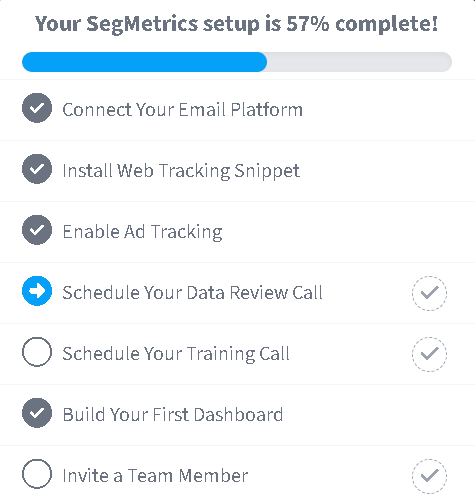
The setup progress indicator appears in the top right area of your account, right next to your account name. This visual checklist shows your completion percentage and guides you through the essential setup steps.
How to track your setup progress
There are a couple of different ways to track your account setup progress. The first way is from the setup progress icon in the top right area of your account, right next to your account name. This is a quick and easy way to see exactly where you're at with your account setup. Click on each item to be taken to the area in your account that will help you complete each step.
The setup checklist includes the following essential steps:
- Connect Your Email Platform
- Install Web Tracking Snippet
- Enable Ad Tracking
- Schedule Your Data Review Call
- Schedule Your Training Call
- Build Your First Dashboard
- Invite a Team Member
Setup steps explained
Essential setup steps (Required)
These steps are crucial for SegMetrics to function properly and provide accurate data:
1. Connect Your Email Platform Integrate your email marketing system (like ActiveCampaign, Mailchimp, or Keap) to track email campaign performance and lead attribution.
2. Install Web Tracking Snippet Add the SegMetrics tracking pixel to your website to monitor visitor behavior and page performance. Learn more about installing the tracking pixel.
3. Enable Ad Tracking Connect your advertising accounts (Facebook, Google Ads, etc.) to track ad performance and ROI. Set up your ad account integrations.
Recommended setup steps
These steps help you get the most value from SegMetrics:
4. Schedule Your Data Review Call Book a free consultation to review your initial data and ensure everything is tracking correctly. Click "Schedule Your FREE Kickoff" to schedule your call.
5. Schedule Your Training Call Get personalized training on how to use SegMetrics effectively for your specific business needs.
6. Build Your First Dashboard Create custom dashboards to visualize your most important marketing metrics. Learn about creating custom dashboards.
7. Invite a Team Member Add team members to collaborate on your marketing analysis. Learn about inviting team members.
Professional services available
If you prefer more one-to-one help or just don't have the time, we offer a couple of different services to get you going:
Done For You Account Setup
With the Done For You Account Setup service, we'll do all the heavy lifting to get your SegMetrics account setup and optimized. We handle getting your tracking configured across all your marketing properties, as well as a fully tracked marketing funnel, complete with KPI-centric dashboard to help you optimize your marketing. Learn more about this service!
Monthly Optimization Blueprint Service
If ongoing 1:1 support is what you're looking for, our Monthly Optimization Blueprint Service is just what you need. This ongoing support service includes 1-2 45 minute calls each month. On these calls, our experienced marketing consultants will help you analyze the data from your SegMetrics account and provide advice on how to optimize your marketing efforts. Sound like a plan? Learn more about this service!
Frequently Asked Questions
Q: How long does it take to complete the setup process?
A: Most users can complete the essential steps (email platform, tracking pixel, and ad tracking) within 1-2 hours. The optional steps like training calls and dashboard building can be done at your own pace.
Q: What happens if I skip some setup steps?
A: While you can use SegMetrics with partial setup, you'll get incomplete data. The email platform and tracking pixel are essential for accurate attribution and ROI tracking.
Q: Can I change my setup later?
A: Absolutely! You can modify integrations, add new tracking, and adjust settings at any time. The setup checklist remains accessible to help you add features as your business grows.
Q: Do I need technical skills to complete the setup?
A: Most steps are designed for non-technical users. The tracking pixel installation may require basic website editing, but we provide detailed guides and support to help you through it.
Q: What if I need help during setup?
A: We offer several support options including documentation, free consultation calls, and professional setup services. Don't hesitate to reach out if you get stuck.
Q: How do I know if my tracking is working correctly?
A: The setup checklist will show green checkmarks for completed steps. You can also schedule a free data review call to have our team verify everything is working properly.
Q: Can I use SegMetrics with multiple websites or businesses? A: Yes, but you'll need to install the tracking pixel on each website and may need separate integrations for different email platforms or ad accounts.
Need help with your setup? Contact our support team or schedule your free consultation call to get personalized assistance.