
Maropost
SegMetrics gives you the ability to analyze your Maropost campaign performance and connect it to other data sources. With this integration, you can easily segment your data to find the sources that eventually lead to clients, understand how different accounts respond to each touchpoint, and track complete customer journey attribution.
Note: This integration provides tag dates, so SegMetrics can accurately record when each tag was applied to a contact.
Integration Overview
SegMetrics takes the spend from your ad platforms and purchases from your payment processor, then connects them to the email addresses in Maropost. This creates a complete picture of your customer journey from first touchpoint to purchase.
You don't need to import orders or tag people in a special way - contacts just need to be in your Maropost account for SegMetrics to connect the data based on email addresses.
Connecting Maropost to SegMetrics
Follow these steps to integrate your Maropost account with SegMetrics:
Step 1: Get Your Maropost API Credentials
First, you'll need to gather your Account ID and API Key from Maropost:
Finding your Account ID:
- Log into your Maropost account
- Look at the URL in your browser after logging in
- Your Account ID is the number after "accounts/" in the URL
- Example: If your URL is
http://app.maropost.com/accounts/1234/dashboard, your Account ID is1234
Creating an API Key:
- In your Maropost account, click your username in the top-right corner
- Select Settings from the dropdown menu
- Navigate to API Keys
- Click ADD KEY
- Enter a descriptive name for the API key
- Assign the necessary access privileges (ensure Campaigns, Account, Contacts, and Reports are selected)
- Click Save
- Copy the generated API Key
Step 2: Connect to SegMetrics
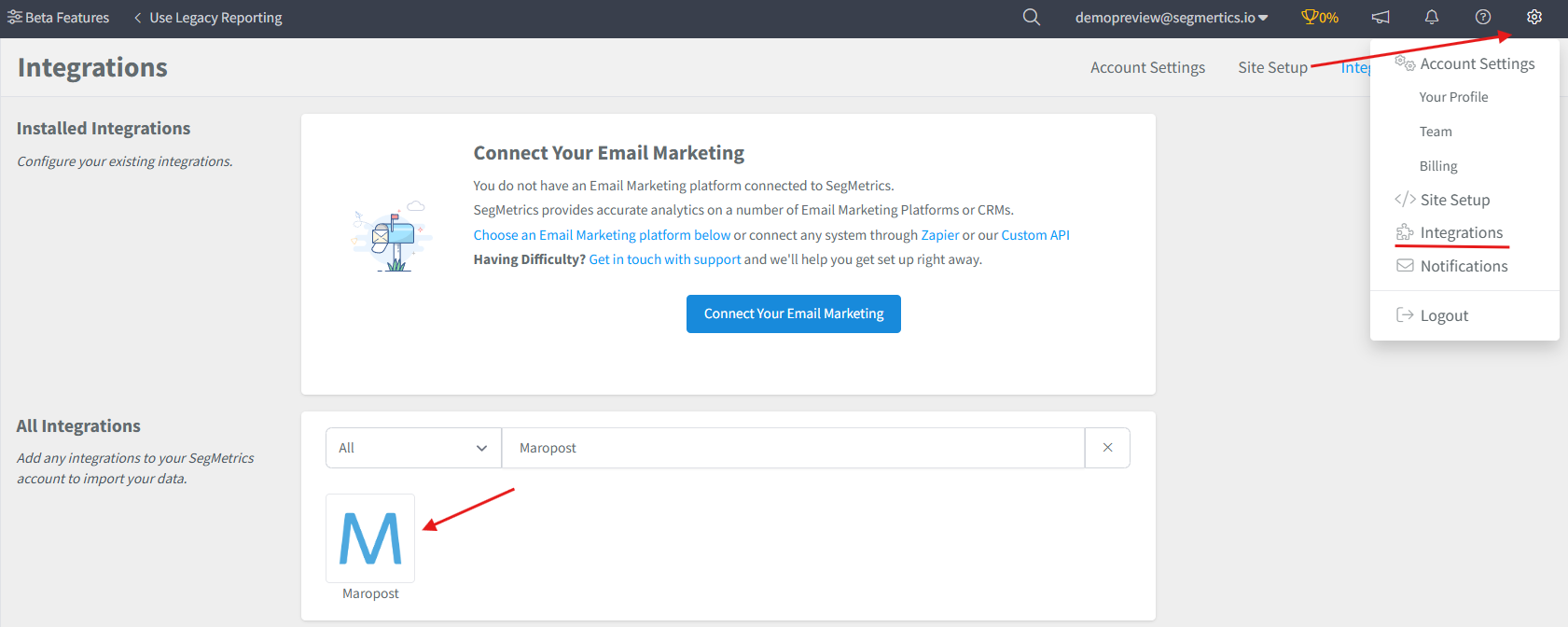
- Navigate to the Integrations page in your SegMetrics account
-
From the list of available integrations, search for and click on Maropost
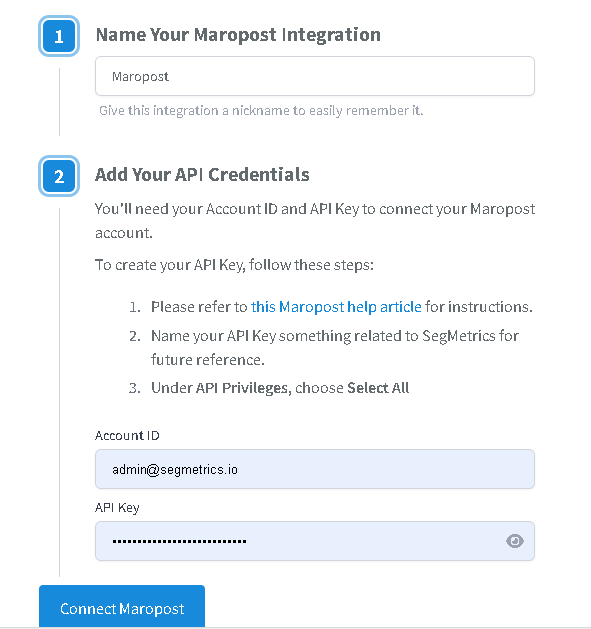
- Enter your Maropost credentials:
- Account ID: The number from your Maropost URL
- API Key: The key you generated in Step 1
- Click Connect to complete the integration
Once connected, SegMetrics will begin importing all historical contact and campaign data from your Maropost account.
Pro Tip: SegMetrics stores all synced Maropost data in its own database, allowing you to accumulate more historical data over time for more comprehensive reporting.
Understanding Available Data and Reports
Once integrated, SegMetrics imports all historical contact and campaign data from your Maropost account. Use the following SegMetrics reports to analyze your Maropost data:
Acquisition Report
Use for tracking new lead metrics from your Maropost campaigns. This shows leads added over specific time periods and helps identify which campaigns are generating the most leads.
Advertisement Report
This is for analyzing the effectiveness of your paid ads. This will show cost per lead, cost to acquire customer, and ROAS.
Nurture Report
Perfect for analyzing Maropost lists, tags, and automation performance. Filter by specific Maropost segments to see how different contact groups perform through your email sequences and nurture campaigns.
Engagement Report
Track email campaign performance and website interactions. Monitor how contacts engage with your Maropost emails and connect that engagement to website behavior and conversions.
Orders Report
Analyze revenue metrics connected to your Maropost contacts. See which email campaigns and automations drive actual purchases when combined with your payment processor data.
Subscriptions Report
For subscription-based products, track how Maropost nurture sequences affect recurring revenue and subscription lifecycle metrics.
You can create custom reports by going to Contacts > New Report, then selecting your desired filters based on dates, tags, and touchpoints.
Connecting Payment Information to Maropost Contacts
Maropost doesn't track payments natively, so SegMetrics uses email address matching to connect payment information to your Maropost leads.
When you integrate your payment processor with SegMetrics, we automatically connect the contacts and purchases together based on their email address. This allows you to see the complete customer journey from email engagement to purchase.
Recommendation: Use whichever payment processor can act as your single source of truth for the most accurate revenue attribution.
Frequently Asked Questions
Q: What time zone is Maropost data synced in?
A: Maropost data is synced in UTC. SegMetrics reports on your data based on the timezone you set in your Account Settings.
Q: How much historical data syncs when I first connect Maropost?
A: When you connect Maropost, all historical data from your account is synced. This includes all contacts, campaigns, automations, and engagement data.
Q: Do I need the tracking pixel to get data from my Maropost account?
A: No, you don't need the tracking pixel to import contact and campaign data from Maropost. However, the tracking pixel is essential for connecting website visitor behavior to email engagement and tracking the complete customer journey.
Q: Where do I find my Account ID if I can't see it in the URL?
A: The Account ID should always appear in your Maropost dashboard URL after "accounts/". If you're having trouble locating it, try logging out and logging back in, or contact Maropost support for assistance.
Q: Can I create reports combining Maropost data with other platforms? A: Yes, SegMetrics automatically connects Maropost contact data with your ad spend, website behavior, and purchase data from other integrated platforms. This gives you complete attribution reporting showing how email marketing contributes to your overall ROI.