
Leadfox
Connect your SegMetrics account to Leadfox and pull in all of your historical leads and contact data. You can then use that data to create comprehensive reports inside SegMetrics to optimize your marketing funnels and track the complete customer journey.
Note: This integration provides tag dates, so SegMetrics can accurately record when each tag was applied to a contact.
In this article
- Connecting Leadfox to SegMetrics
- Understanding available data and reports
- Frequently asked questions
Connecting Leadfox to SegMetrics
Follow these steps to integrate your Leadfox account with SegMetrics:
- Navigate to the Integrations page in your SegMetrics account
-
Click on the Leadfox integration
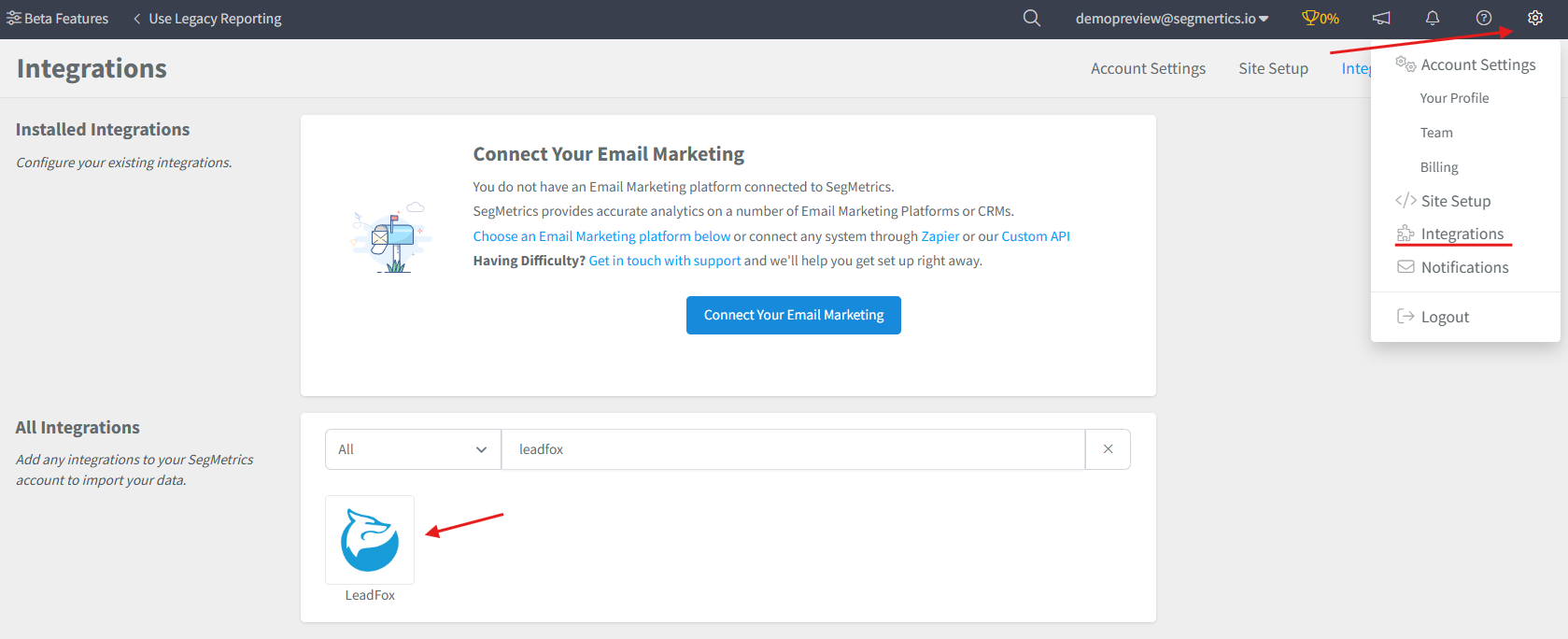
Important Note: You can connect to a single CRM or Email tool at a time. If you've already connected to a CRM or email tool, you'll need to disconnect from that tool in order to integrate with Leadfox.
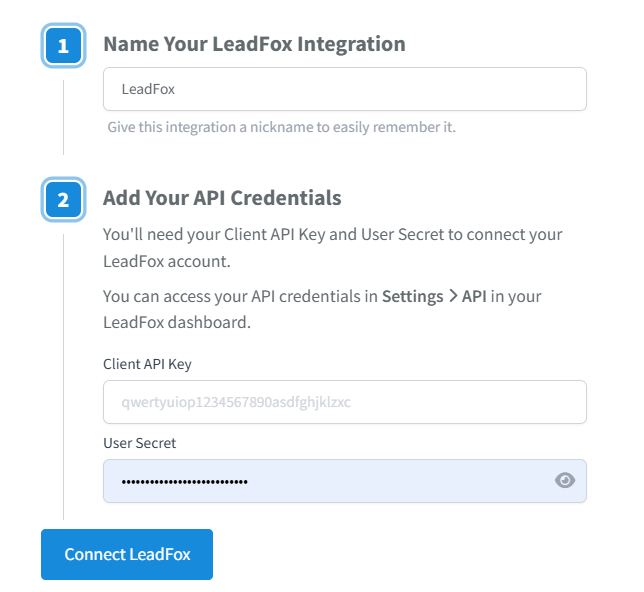
- Enter your Leadfox account credentials (find these at Settings > API in your Leadfox account):
- Client API Key
- User Secret
- Click Connect Leadfox
Once integrated, SegMetrics imports all historical contact and deal information from your Leadfox pipelines.
Pro Tip: SegMetrics stores all synced Leadfox data in its own database, allowing you to accumulate more historical data over time for more comprehensive reporting.
Understanding Available Data and Reports
Once integrated, SegMetrics imports all historical contact and deal information from your Leadfox pipelines. Use the following SegMetrics reports to analyze your Leadfox data
Acquisition Report
Use for tracking new lead metrics from your Leadfox account. This shows leads added over specific time periods and helps identify lead generation trends.
Advertisement Report
This is for analyzing the effectiveness of your paid ads. This will show cost per lead, cost to acquire customer, and ROAS.
Nurture Report
Perfect for analyzing tags and list metrics. Filter by specific Leadfox tags to see how different contact segments perform through your nurture sequences.
Engagement Report
Track funnel page and email metrics. Monitor how contacts interact with your content and email campaigns within Leadfox.
Orders Report
Analyze revenue metrics and track sales performance. Connect Leadfox lead data to actual purchases to calculate ROI.
Subscriptions Report
For subscription-based products, track recurring revenue and subscription lifecycle metrics.
Deal Pipelines Report
Use Leadfox's deal filters to segment by deal name, pipeline name, pipeline stage name, and more. This report helps track your sales process effectiveness.
Frequently Asked Questions
Q: What time zone is Leadfox data synced in?
A: Leadfox data is synced in UTC. SegMetrics reports on your data based on the timezone you set in your Account Settings.
Q: How much historical data syncs when I first connect Leadfox?
A: When you connect Leadfox, all historical data from your account is synced. This includes all contacts, deals, tags, and pipeline information.
Q: Do I need the tracking pixel to get data from my Leadfox account?
A: No, you don't need the tracking pixel to import contact and deal data from Leadfox. However, the pixel is essential for tracking website visitor behavior and connecting lead sources to conversions that happen weeks or months later. Tracking Links provide additional detail about exactly which links contacts clicked for ads, email broadcasts, or campaigns.
Q: Can I connect multiple CRM or email tools to SegMetrics?
A: No, SegMetrics supports connecting to one CRM or email tool at a time. If you need to switch from another tool to Leadfox, you'll need to disconnect the existing integration first.
Q: What happens to my data if I disconnect and reconnect Leadfox?
A: SegMetrics stores synced data in its own database, so disconnecting won't lose your historical data. When you reconnect, SegMetrics will sync any new data that was added during the disconnection period.