
ReCharge
ReCharge is a leading subscription payments platform that enables businesses to manage recurring billing and subscription products. By integrating ReCharge with SegMetrics, you gain access to comprehensive subscription analytics and can track the complete customer journey from acquisition through recurring revenue.
Integration overview
SegMetrics integrates with ReCharge to import your complete subscription and transaction history, providing detailed analytics on your recurring revenue business. The integration pulls subscription data, customer information, and transaction details to give you a holistic view of your business performance.
Key benefits:
- Complete historical data import of all ReCharge transactions
- Real-time synchronization of new subscriptions and payments
- Revenue attribution across different customer touchpoints
- Comprehensive subscription analytics and customer lifecycle insights
- Support for all ReCharge data types including orders, discounts, and customer information
Data imported includes:
- Orders and transactions
- Subscription details and recurring billing
- Customer profiles and payment methods
- Discount codes and promotions
- Product catalogs and pricing
- Account and billing information
Requesting a ReCharge API token
Before connecting ReCharge to SegMetrics, you need to request an API token from ReCharge support and configure the appropriate permissions.
Step 1: Contact ReCharge support
- Submit a request to ReCharge support
- Request a new API token for SegMetrics integration
- Wait for confirmation that your API token has been created
Step 2: Access your API token
- Log into your ReCharge Dashboard
- Navigate to Integrations > API Tokens (located in the right-hand corner)
- Locate your newly created API token in the list
Step 3: Configure API permissions
Enable Read Access for the following data types in your ReCharge API token settings:
- Orders - Transaction and purchase data
- Discounts - Promotional codes and discounts applied
- Subscriptions - Recurring billing and subscription details
- Payments - Payment processing and transaction history
- Customers - Customer profiles and contact information
- Products - Product catalog and pricing information
- Accounts - Account-level settings and configurations
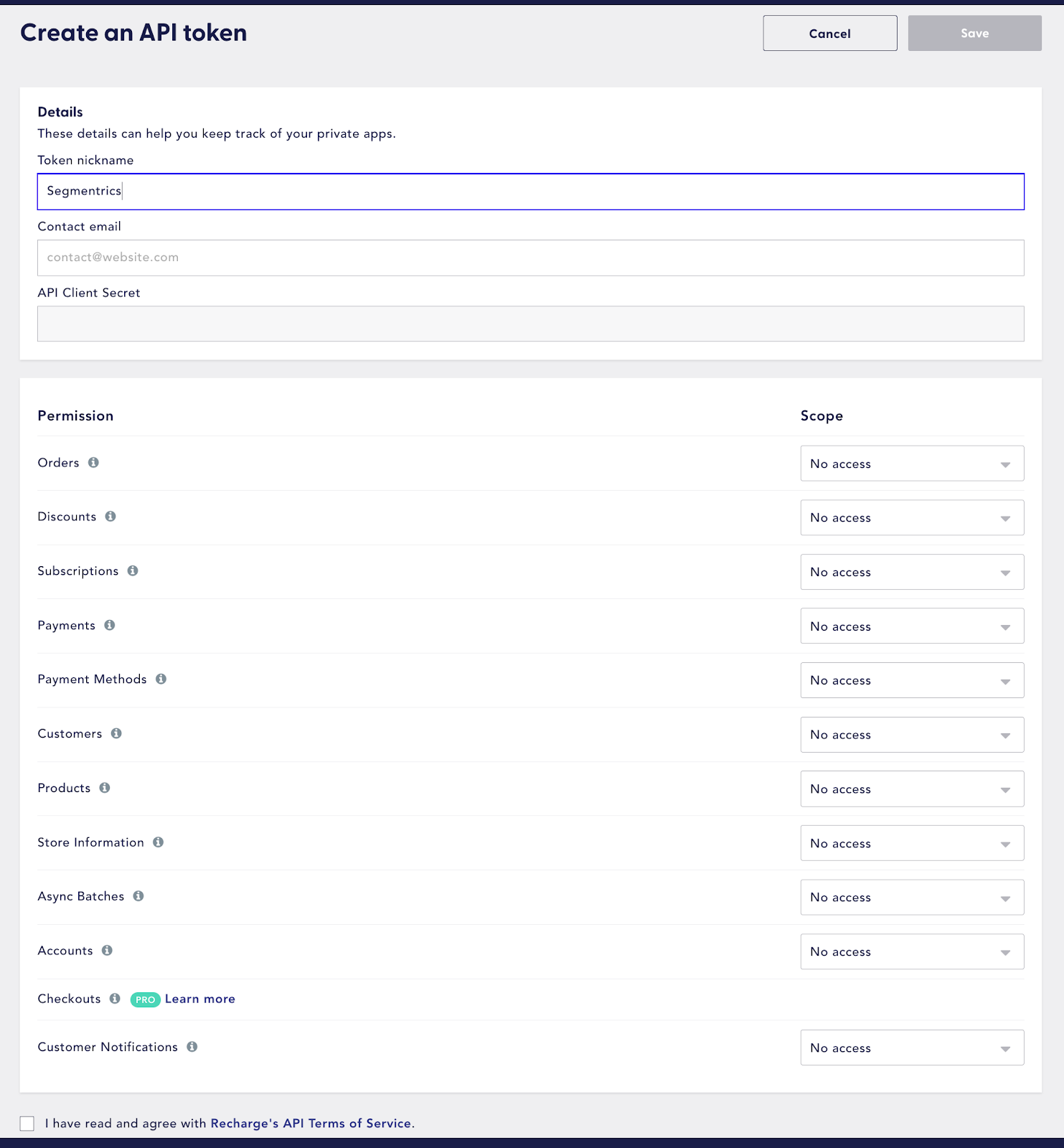
Important: All seven data types must have Read Access enabled for SegMetrics to properly import and synchronize your ReCharge data.
Connecting ReCharge to SegMetrics
Once you have your ReCharge API token with proper permissions, you can connect it to SegMetrics.
Step 1: Access SegMetrics integrations
- Navigate to your SegMetrics integration page
- Locate and select the ReCharge integration option
Step 2: Enter your API token
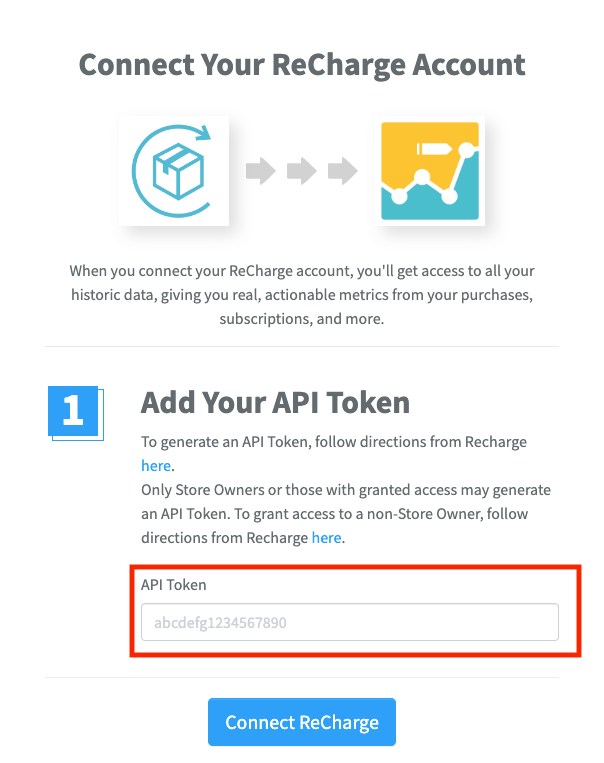
- Click "Connect ReCharge" to open the connection dialog
- Enter your ReCharge API token in the provided field
- Click "Connect ReCharge" to establish the integration
Step 3: Verify connection
Once connected, SegMetrics will begin importing all of your historical ReCharge data. This process may take some time depending on your data volume, but you'll be able to access your subscription analytics as soon as the import completes.
Understanding ReCharge data in SegMetrics reports
ReCharge subscription data appears differently across SegMetrics reports based on what customer activities and timeframes you're analyzing. Understanding these distinctions is crucial for accurate reporting.
Revenue attribution by report type
Acquisition Reports show revenue and customers from NEW customers only:
- Revenue attributed to new customers during the selected date range
- Subscription revenue from customers who first subscribed in that period
- Excludes recurring payments from existing subscribers who first subscribed earlier
Engagement Reports show revenue from customers who visited your website:
- Revenue from leads/customers who hit your website during the selected date range
- Includes both new and existing customers who showed engagement activity
- Filters subscription revenue based on website interaction within the timeframe
Orders Reports show ALL revenue regardless of customer status:
- Complete subscription revenue including new customers, recurring payments, and renewals
- All ReCharge transactions within the selected date range
- Most comprehensive view of total subscription revenue performance
Subscription-specific metrics
ReCharge data provides unique subscription insights including:
- Monthly Recurring Revenue (MRR) - Predictable monthly subscription income
- Customer Lifetime Value (CLV) - Total revenue potential from subscription customers
- Churn Rate Analysis - Subscription cancellation patterns and trends
- Subscription Growth - New subscriptions vs. cancellations over time
- Revenue per Subscriber - Average subscription value and growth
Frequently asked questions
Q: How long does the initial data import take?
A: Initial import time depends on your ReCharge data volume. Most integrations complete within a few hours, though larger datasets may take longer. You'll receive notifications once the import is complete.
Q: Can I connect multiple ReCharge accounts to SegMetrics?
A: Each SegMetrics workspace can connect to one ReCharge account. If you need to analyze multiple ReCharge accounts, you'll need separate SegMetrics workspaces for each integration.
Q: What happens if I don't have all required API permissions enabled?
A: Without proper Read Access permissions for all seven data types (Orders, Discounts, Subscriptions, Payments, Customers, Products, Accounts), the integration may not import complete data or could fail entirely.
Q: Does SegMetrics support ReCharge's latest 2024-2025 features?
A: Yes, SegMetrics integrates with ReCharge's current REST API, supporting their latest subscription management features, webhook infrastructure, and enhanced analytics capabilities introduced in recent updates.
Q: How does subscription revenue appear in different SegMetrics reports?
A: Subscription revenue attribution varies by report type: Acquisition reports show revenue only from new customers, Engagement reports show revenue from customers who interacted with your site, and Orders reports show all subscription revenue regardless of customer status.
Still need help? Contact our support team for assistance with your ReCharge integration.
Note: This documentation was verified against ReCharge's current API capabilities and platform updates. ReCharge continues to evolve their subscription platform - refer to ReCharge's official API documentation for the most current technical specifications and feature details.