
How to Connect Integrations Through Third-Party Access
When setting up SegMetrics, you may need to connect integrations like CRM systems, email marketing platforms, payment processors, or advertising accounts that you don't have direct access to. This guide shows you how to request assistance from someone with the proper permissions to connect these integrations on your behalf.
When to Use Third-Party Connection Requests
During your SegMetrics setup, you'll be prompted to connect various integrations. If you don't have the necessary permissions or access credentials for any integration, you can invite an authorized person to connect it for you. This is particularly useful when:
- Someone else manages your company's CRM or email marketing platform
- You need access to advertising accounts managed by an agency
- Payment processors are controlled by your finance team
- Integration credentials are held by technical team members
How to Send a Connection Request
Step 1: Locate the Connection Request Option
- Navigate to the integration you need help accessing during setup
- Look for the blue link "Ask another person to connect" located below the main connection button
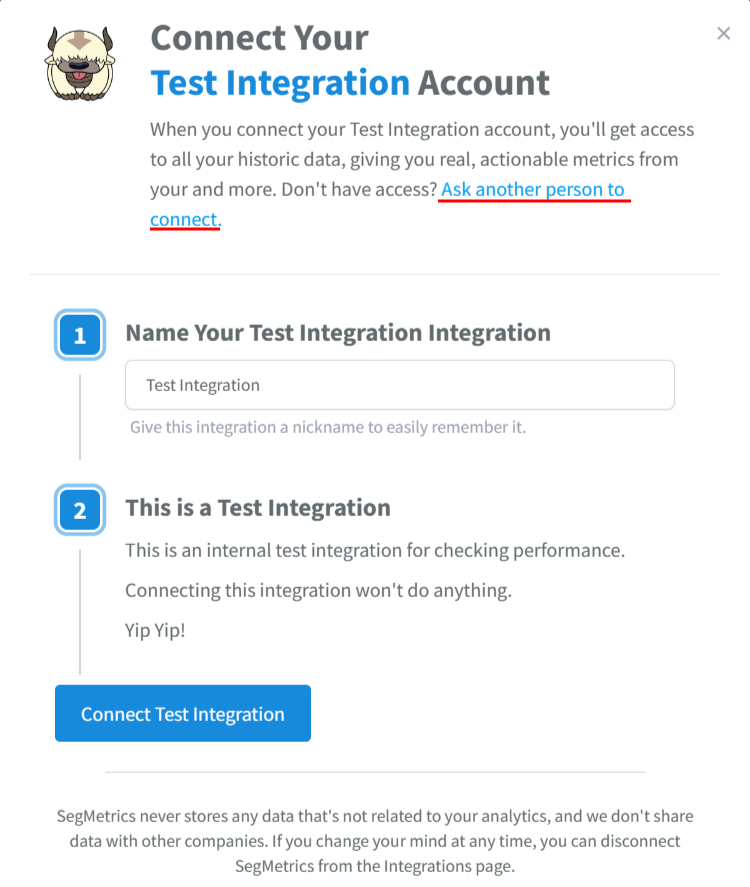
Step 2: Send the Request
- Click the "Ask another person to connect" link
- A Connection Request modal will appear
- Enter the email address of the person who has access to the integration
- Alternatively, you can send them the request link directly
- Optionally request them to configure additional settings (ads, email setup, etc.)
Step 3: Complete Your Part
Once you've sent the request, your role is complete. The authorized person will receive the connection request and can proceed with the integration setup.
What Happens Next
The invited person will go through a streamlined connection process:
- Separate Access Path: They'll use a dedicated route that doesn't require logging into your SegMetrics account
- Integration Connection: They'll connect the integration using their credentials
- Configuration: If there are settings to configure, they'll see and select the appropriate options
- Completion Notification: Once connected, you'll receive an email alert confirming the integration is active
The third-party connection process is designed to be secure and limited in scope, ensuring the invited person can only connect the specific integration without accessing your SegMetrics account.
Additional Resources
For complete setup instructions after your integrations are connected, visit: Setup Instructions
Frequently Asked Questions
Q. What access does the third party have to my SegMetrics account?
A. The person you send the request to can only connect the specific integration. They won't have access to your SegMetrics account, data, or any other features within the platform.
Q. How do I give someone full access to my SegMetrics account?
A. To invite team members with full account access, go to your account settings and send invitations via email or link. See our team member invitation guide for detailed instructions.
Q. What if the person I invited doesn't receive the connection request?
A. Check that you've entered the correct email address and ask them to check their spam folder. You can also send them the direct request link as an alternative.
Q. Can I revoke a connection request after sending it?
A. Connection requests are designed to be completed quickly. If you need to cancel a request, contact our support team for assistance.
Q. What happens if the integration connection fails?
A. If there are issues during the connection process, both you and the invited person will be notified. You can then troubleshoot together or contact support for additional help.
Don't let permissions get in the way of setting up your account and accessing valuable insights. Happy analyzing!