
UltraCart
SegMetrics gives you the ability to analyze your marketing campaign performance by connecting UltraCart with other data sources. With that information, you can easily segment that data into your leads, find the automation triggers that convert to customers, understand where your most valuable leads are coming from, and more!
UltraCart Integration Overview
UltraCart's sales data flows seamlessly into SegMetrics, allowing for long-term ROI tracking from paid ads and long-term attribution to purchase. The integration enables advanced segmentation and automations based on checkout behavior.
SegMetrics takes the spend from your ad platforms and purchases from UltraCart then connects them to the email addresses in your CRM. You don't need to import the orders or tag people in a special way: they just need to be in UltraCart and CRM!
Important note: If a customer email is different in UltraCart than what's in your CRM, their purchase/revenue will not be displayed within SegMetrics.
How to connect UltraCart to SegMetrics
-
Click on the gear icon in the top right corner and then click Integrations.
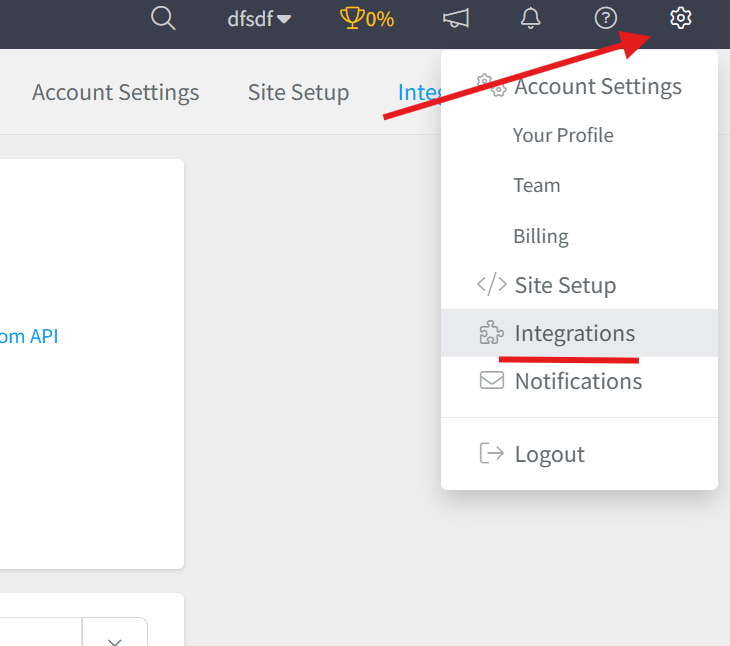
Once you're on the Integrations page, you can find the UltraCart integration one of three ways:
- Select the Payments processing list and find it there
- Search UltraCart in the search bar
- Scroll down through all the integrations (they're listed in alphabetical order) and click the UltraCart integration
-
This will open the connection window. Name your UltraCart integration then click the blue Connect UltraCart button.
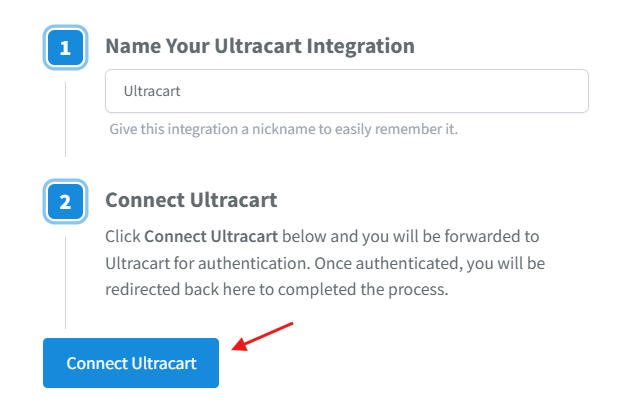
- This will open the Activation window, where you will be prompted to connect through OAuth to SegMetrics.
SegMetrics will automatically match the email addresses in UltraCart with those in your CRM and connect the payment data automatically.
Note: If you have more than one payment processor, we recommend using whichever can act as the single source of truth.
How to use UltraCart in SegMetrics Reporting
Since UltraCart is a revenue integration, it appears in the following SegMetrics reports:
- Acquisition Reports: NEW customers only
- Nurture Reports: customers who received tags/list additions
- Engagement Reports: customers who interacted with website
- Orders Reports: ALL revenue regardless of status
- Subscriptions Reports: customers who started subscriptions
Note: What SegMetrics considers a subscriber or subscription may vary slightly compared to UltraCart's definitions.
When you connect UltraCart, all historical data from your UltraCart account is synced. Once UltraCart is connected and actively syncing data, SegMetrics stores the data in its own database, allowing you to accumulate more data over time for more comprehensive historical reporting.
To create reports with your UltraCart data:
- Go to Conversions on the left navigation bar. Then click Orders.
- Select your desired filters based on dates, tags and touchpoints.
- Save it for later use or to use the data in a custom dashboard.
Frequently Asked Questions
Q: What time zone is UltraCart data synced in?
A: UltraCart data is synced in UTC. SegMetrics reports on your data based in the timezone that you set in your Account Settings.
Q: Do I need the tracking pixel to get the data found in my UltraCart account?
A: You do not need to create a Tracking Link or add our tracking pixel for SegMetrics to track website purchases.
Q: If no pixel is needed how does SegMetrics show accurate revenue?
A: SegMetrics uses its API connection with UltraCart to pull in invoices. Within those invoices are emails that we connect and overlap with the emails we pull in from your CRM. This allows us to attribute every dollar to a person and product.
Q: How much historical data is synced when I first connect UltraCart?
A: When you connect UltraCart to SegMetrics, all historical data from your UltraCart account is synced automatically.
Q: Is UltraCart's API still reliable in 2025?
A: Yes, UltraCart continues to maintain a robust REST API (Version 2) with regular platform updates. As of 2025, they provide comprehensive API functionality for order processing, inventory management, and customer data integration, with active development and platform enhancements released monthly.