
MindBody
SegMetrics integrates with MindBody to help you analyze your fitness and wellness business data and connect it to other marketing sources. Segment your data into leads, find automation triggers that convert to customers, and understand where your most valuable leads are coming from.
Integration Overview
SegMetrics imports your contacts, custom fields, and orders directly from MindBody. The integration stays up-to-date with the most recent information in your MindBody account to ensure you always have access to the data you need.
Key benefits include:
- Automatic import of MindBody payment tracking data
- Integration with external payment processors via email matching
- Complete client journey tracking from lead to paying member
- Class booking and membership revenue attribution
- Custom field and contact segmentation capabilities
How to Connect MindBody to SegMetrics
Step 1: Access Integrations
- Click the gear icon in the top right corner of SegMetrics
- Select "Integrations" from the menu and search for MindBody
Step 2: Find Your MindBody Site ID
You'll need your MindBody Site ID (also called Client ID) to complete the integration. You can find this in one of these ways:
- In your MindBody account: Look at the bottom right of your MindBody dashboard screen
- From the MindBody launch page: Visit https://clients.mindbodyonline.com/launch and search for your business name to see your Site ID
- Contact MindBody support: If you can't locate your Site ID, MindBody's support team can help you find it
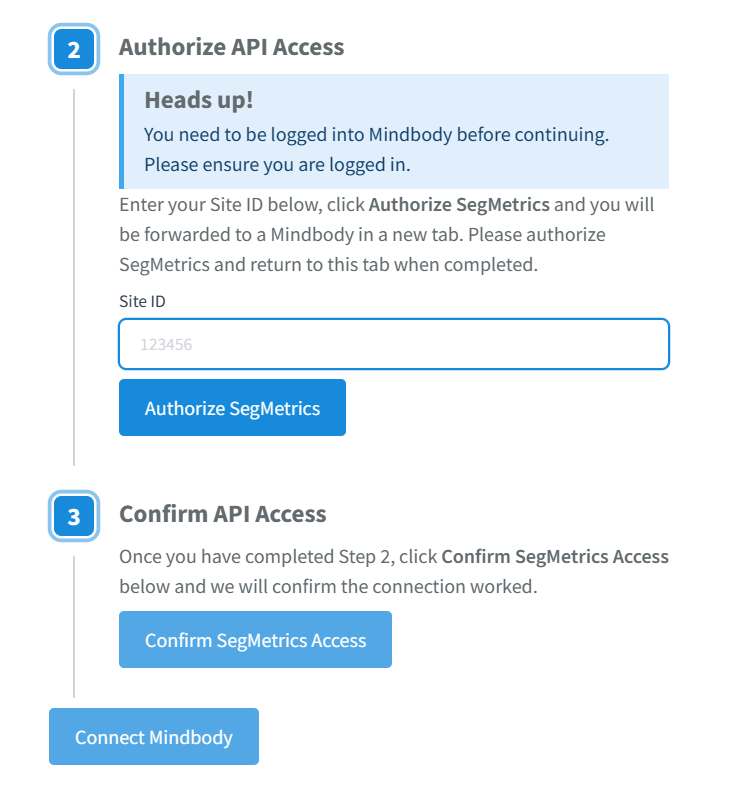
Step 3: Complete Authorization
- Enter your Site ID in the activation window
- Click "Authorize SegMetrics" - you'll be forwarded to MindBody in a new tab
- Authorize SegMetrics in MindBody and return to the original tab
- Click "Confirm SegMetrics Access" to complete the connection
The integration will begin importing your MindBody data automatically. You'll receive an email notification when the import is complete.
Using SegMetrics Reports with MindBody Data
Once connected, use these SegMetrics reports to analyze your MindBody data:
Acquisition Report → Track new client acquisition metrics and lead generation performance for fitness/wellness services
Advertisement Report → This is for analyzing the effectiveness of your paid ads. This will show cost per lead, cost to acquire customer, and ROAS.
Nurture Report → Analyze client engagement through class attendance patterns, membership progression, and email sequences
Engagement Report → Monitor booking page performance, class sign-up rates, and client interaction metrics
Orders Report → Review service purchase revenue, membership sales, and package conversions
Subscriptions Report → Track membership performance, renewal rates, and subscription revenue analysis
Historical Data Sync
When you first connect MindBody, all historical data from your account syncs automatically including client information, purchase history, and membership records. Note that click data can only date back to when the SegMetrics tracking pixel was first installed on your pages.
Pro Tip: SegMetrics stores imported data in its own database, allowing for accumulation of more detailed historical reporting as additional sync cycles occur over time.
Frequently Asked Questions
Q: What timezone is MindBody data synced in?
A: MindBody data syncs in UTC. SegMetrics displays reports based on the timezone set in your Account Settings.
Q: Does SegMetrics import bookings from MindBody?
A: Currently, SegMetrics doesn't import booking data from MindBody, but this functionality is planned for the near future.
Q: Do I need SegMetrics tracking links for MindBody data?
A: No, tracking links aren't required to import MindBody data. However, they provide additional detail about specific campaign performance and UTM attribution.
Q: How do I track opt-ins on MindBody booking pages?
A: Install the SegMetrics tracking pixel on your MindBody booking pages and forms. You can test these using the debugger tool in your SegMetrics settings page.
Q: What if I don't use MindBody's payment integration?
A: You can integrate your external payment processor with SegMetrics. We recommend using whichever payment processor can serve as your single source of truth for revenue tracking.