
Attio
Connect Attio to SegMetrics to unlock deeper insights, accurate revenue attribution, and full customer journey tracking. Gain clarity on which sales pipelines, deal stages, and relationship-building activities drive the most conversions and revenue for your business.
Step 1: Access Integrations in SegMetrics
- Log in to your SegMetrics account.
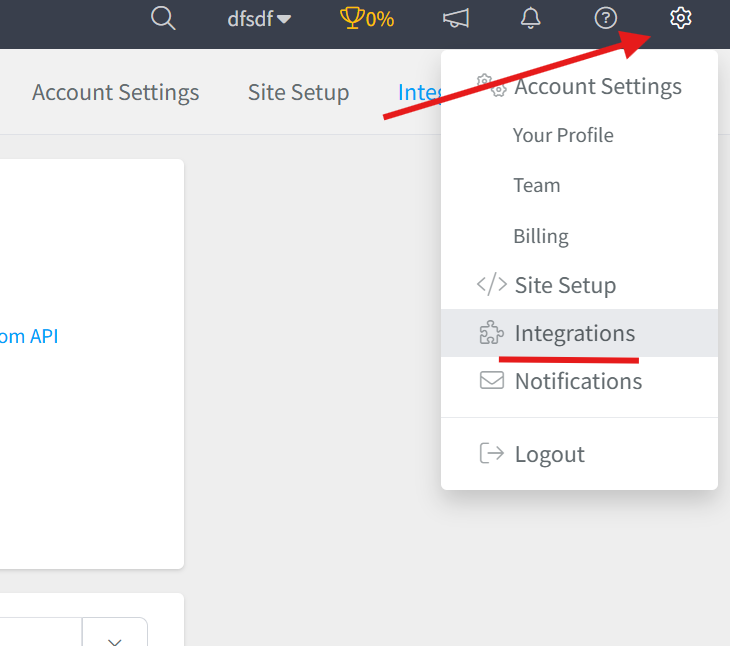
- From your dashboard, click Settings.
- Navigate to Integrations.
Step 2: Select the Attio Integration
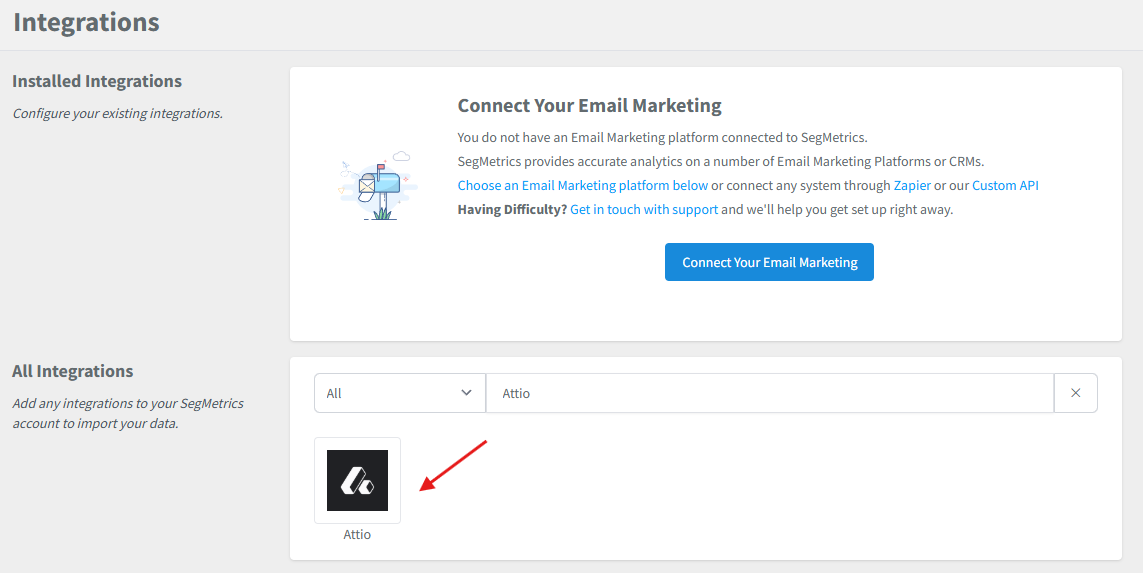
- Browse or search for Attio in the integrations list.
- Click on the Attio Integration.
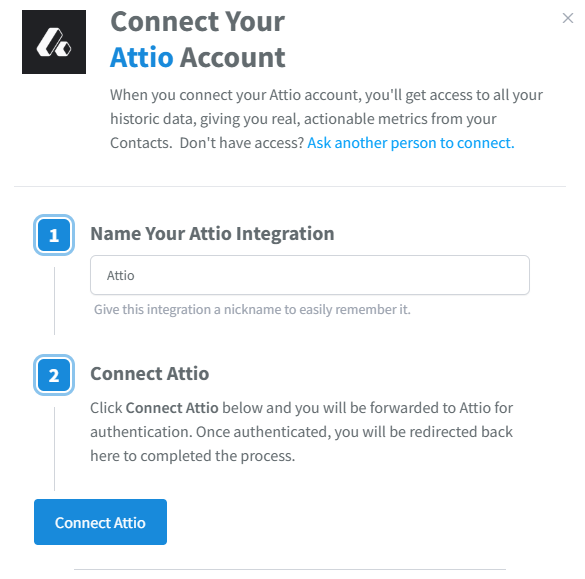
- Give your integration a clear name.
Step 3: Connect Your Attio Account to SegMetrics
- On the Attio integration setup page in SegMetrics, click the Connect Attio button.
- You will be redirected to Attio to authorize the connection.
-
Log in to your Attio account if prompted.
- Review the permissions that SegMetrics is requesting access to, which may include:
- Read access to contact and company records
- Read access to deal pipelines and stages
- Read access to lists and segments
- Read access to tasks and activities
- Click Authorize or Allow Access to grant SegMetrics permission to access your Attio data.
- You will be redirected back to SegMetrics automatically.
- Your integration status will show as Connected once the authorization is complete.
Note: The connection process uses secure OAuth authentication, which means you don't need to manually copy and paste any API credentials. The connection is established safely between the two platforms.
Frequently Asked Questions
Q: What are the benefits of connecting Attio to SegMetrics?
A: Connecting Attio to SegMetrics gives you deeper insights into your sales processes, accurate revenue attribution, and full customer journey tracking, helping you understand which deal stages, contact touchpoints, sales pipelines, and relationship-building activities drive the most conversions, closed deals, and revenue for your business.
Q: What API credentials do I need to connect Attio to SegMetrics?
A: You'll need an Access Token from your Attio workspace. This can be created by clicking the dropdown beside your workspace name, selecting Workspace settings, navigating to the Developers tab, and creating a new access token with the appropriate scopes (Object configuration, Records, Lists, and Tasks at minimum).
Q: How do I complete the connection between Attio and SegMetrics?
A: Once you have your Attio Access Token, go to Settings → Integrations in SegMetrics, select the Attio integration, give it a clear name, paste in your Access Token into the corresponding field, then click Connect or Authorize to finalize the setup.
Q: What can I track once Attio is connected to SegMetrics?
A: With the integration active, you can track how your Attio sales activities tie directly to revenue, monitor customer and prospect journeys from first contact through deal closure, analyze pipeline performance and conversion rates at each stage, track relationship touchpoints and engagement metrics, and gain clearer attribution across your sales funnels and revenue streams.
Q: Can I use the same Attio access token for multiple integrations?
A: Yes, you can use the same access token to connect Attio to multiple platforms or tools. However, for better security and tracking, it's recommended to create separate tokens for different integrations with only the necessary scopes enabled for each. This allows you to easily identify which integration is accessing your data and revoke access to specific integrations if needed without affecting others.