
Faecbook Lead Forms and Leads Bridge
Learn how to use Leadsbridge to automatically send Facebook Lead Ads data to SegMetrics for comprehensive lead tracking and attribution.
Leadsbridge provides an alternative to Zapier for connecting Facebook Lead Ads (also known as Facebook Instant Forms) to SegMetrics. This integration automatically sends lead information from your Facebook campaigns directly to SegMetrics for proper attribution tracking.
What you'll need:
- Active Leadsbridge account
- SegMetrics account with Account ID
- Facebook Lead Ads campaigns
- Access to Facebook Ads Manager
Setting Up Your Leadsbridge Integration
Step 1: Access Your Leadsbridge Account
- Log into your Leadsbridge account
- If you don't have an account, you can create one for free
- Navigate to your dashboard
Step 2: Create a New Bridge
- Click on Create new Bridge from your dashboard
- This will start the integration setup process
Step 3: Configure the Source (Facebook)
- Select Facebook Instant Forms as your source
- Connect to your Facebook account when prompted
- Authorize Leadsbridge to access your Facebook Lead Ads data
- Choose the specific Lead Ad form you want to connect
Step 4: Configure the Destination (SegMetrics)
- Select HTTP Request (GET/POST) as your destination
- Click Create a new Integration
Step 5: Set Up the SegMetrics Endpoint
https://track.segmetrics.io/collect/?t=view&v=2&a=YOUR_ACCOUNT_ID_HERE&r=facebook.com&dl=https%3A%2F%2Ffacebook%2Ecom%2Fleads%2F%3Fad%5Fid%3D@@ad_id@@%26email%3D@@email@@
Important: Replace YOUR_ACCOUNT_ID_HERE with your actual SegMetrics Account ID.
Step 6: Configure Request Settings
- Method: Select GET
- Content type: Select application/x-www-form-urlencoded
- Click Authorize to confirm the settings
- Click Continue to proceed
Step 7: Map Data Fields
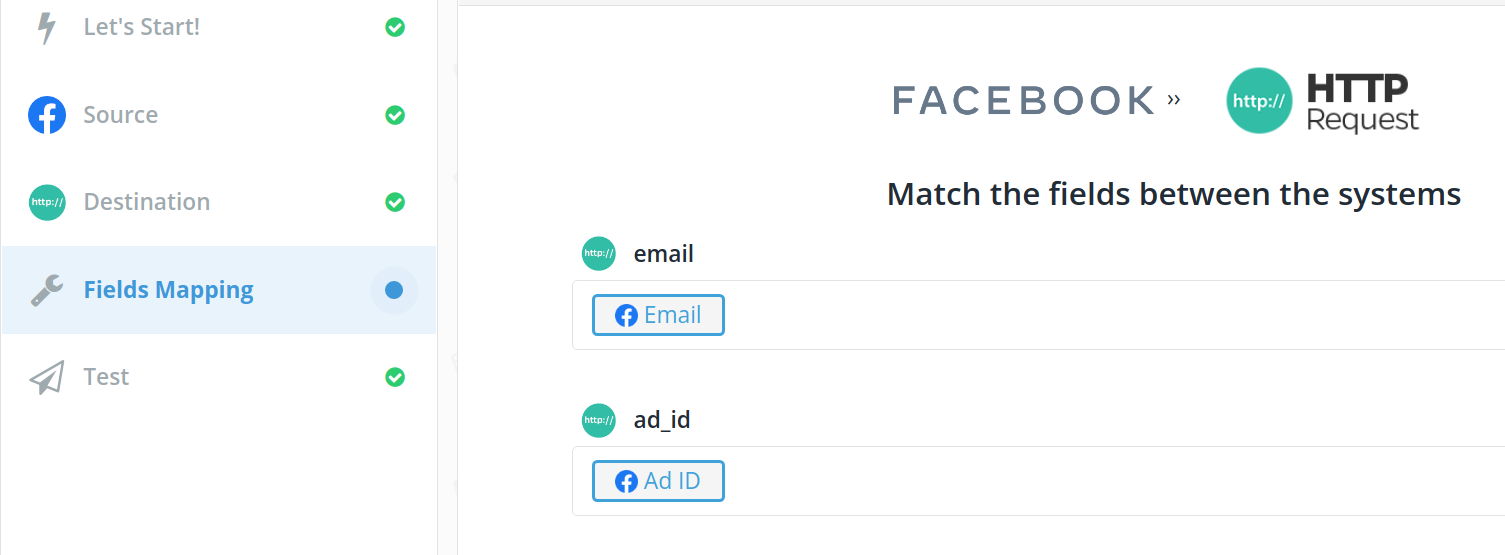
- Click Fields Mapping
- Match the following fields:
- Email: Map to the Facebook Email field
- ad_id: Map to the Facebook Ad ID field
- Ensure all required fields are properly connected
Step 8: Finalize and Test
- Click Next to review your settings
- Click Save & Publish to create the bridge
- Verify your new Bridge shows as active in your dashboard
Verification and Testing
Once your bridge is active, new Facebook Lead Ads submissions will automatically be sent to SegMetrics. The integration will:
- Track each lead as a page view in SegMetrics
- Include the Facebook Ad ID for proper attribution
- Associate the lead with the correct referrer source (facebook.com)
- Enable you to track the complete customer journey from ad click to purchase
You can verify the integration is working by:
- Checking your Leadsbridge dashboard for successful data transfers
- Looking for new page view events in your SegMetrics account
- Monitoring that lead data includes the proper Facebook attribution
Benefits of Using Leadsbridge
- Enterprise-grade security: Leadsbridge offers robust data protection
- Real-time sync: Leads are transferred immediately after form submission
- Reliable delivery: Built specifically for marketing data integration
- Facebook partnership: Leadsbridge is an official Meta Business Partner
Frequently Asked Questions
Q: How does Leadsbridge compare to using Zapier for this integration?
A: Leadsbridge is specifically designed for marketing integrations and offers more robust Facebook Lead Ads connectivity. It's particularly beneficial for high-volume lead generation campaigns that require reliable, real-time data transfer.
Q: What happens if my Facebook Lead Ad form changes?
A: You'll need to update your field mapping in Leadsbridge if you add or remove fields from your Facebook form. The integration will continue working for existing mapped fields.
Q: Can I use this integration with multiple Facebook Ad accounts?
A: Yes, you can create separate bridges for different Facebook Ad accounts. Each bridge can be configured with its own field mapping and settings.
Q: How quickly do leads appear in SegMetrics?
A: Leads typically appear in SegMetrics within seconds of form submission, as Leadsbridge processes data in real-time.
Q: Is there a limit to how many leads can be processed?
A: Leadsbridge offers different pricing tiers based on data volume. Check your Leadsbridge plan details for specific limits and upgrade options if needed.
Need additional help? Contact our support team at support@segmetrics.io