
Miva
Miva is a B2B/B2C ecommerce platform that helps businesses manage large product catalogs, process orders, and handle complex transactions. By integrating Miva with SegMetrics, you can track revenue, analyze customer purchase behavior, and understand the complete customer journey from marketing touchpoint to purchase.
Requirements
- An active SegMetrics account
- A Miva account (version 9.12.00 or greater)
- Access to create API tokens in your Miva admin panel
- An integrated CRM or ESP (required to match revenue to contacts)
Step 1: Create Your API Key in Miva
Before connecting Miva to SegMetrics, you'll need to create an API token in your Miva admin panel. For detailed instructions, please refer to this Miva help article.
Configure Your API Token Settings
- Log in to your Miva admin panel
- Navigate to Users from the main menu
- Select API Tokens
- Click Add to create a new API token
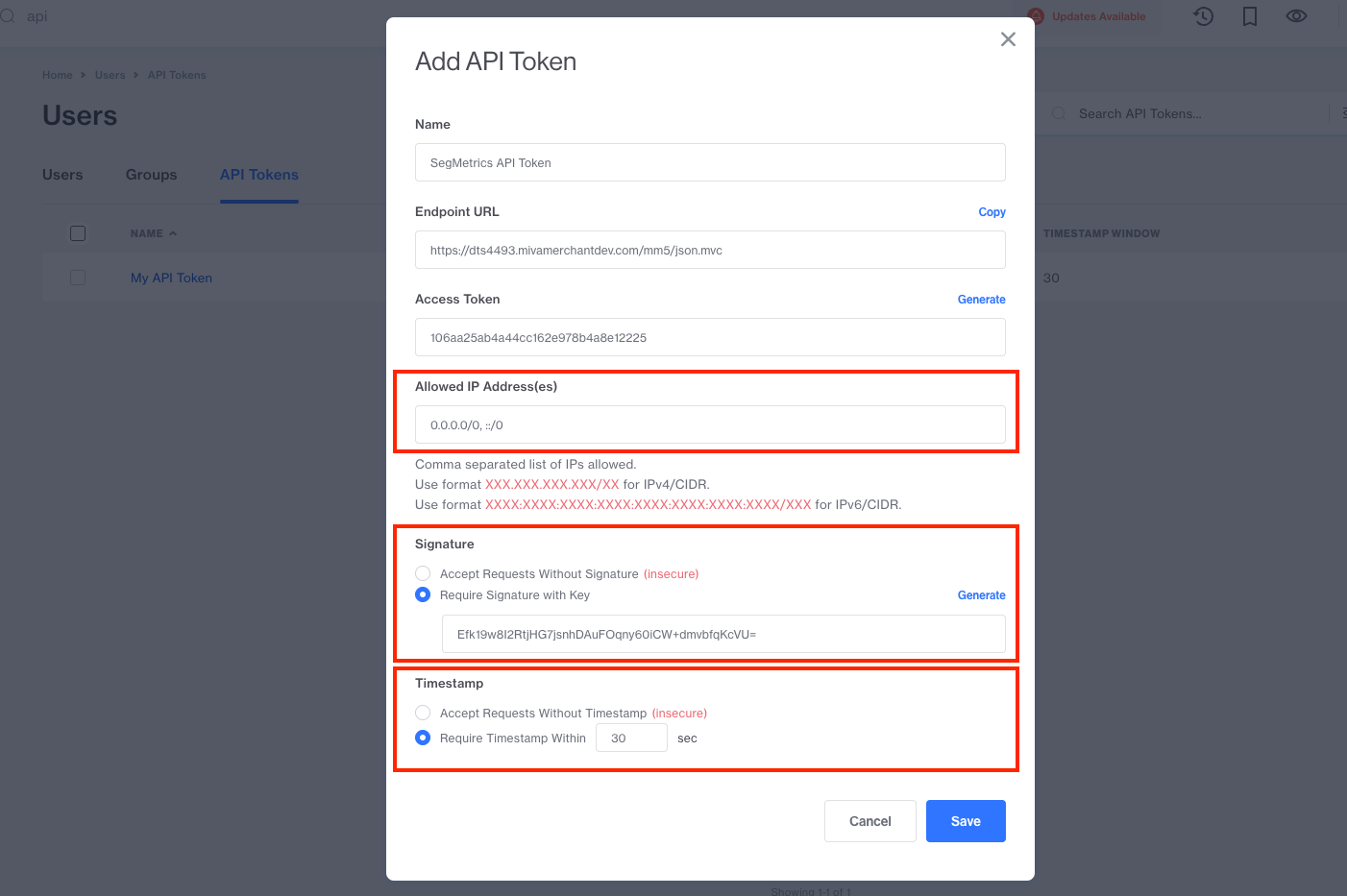
- Configure the following settings:
- Name: Enter a descriptive name such as "SegMetrics API Token" for future reference
- Allowed IP Address(es): Enter "0.0.0.0/0, ::/0" to allow connections from SegMetrics
- Require Signature with Key: Check this box to enable signature authentication
- Require Timestamp: Check this box to enable timestamp validation
Step 2: Add Function Permissions
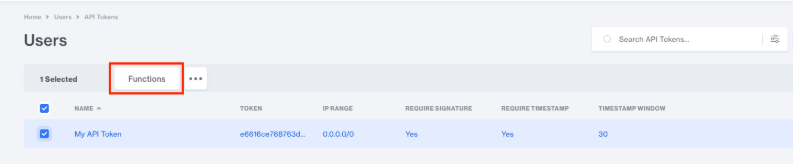
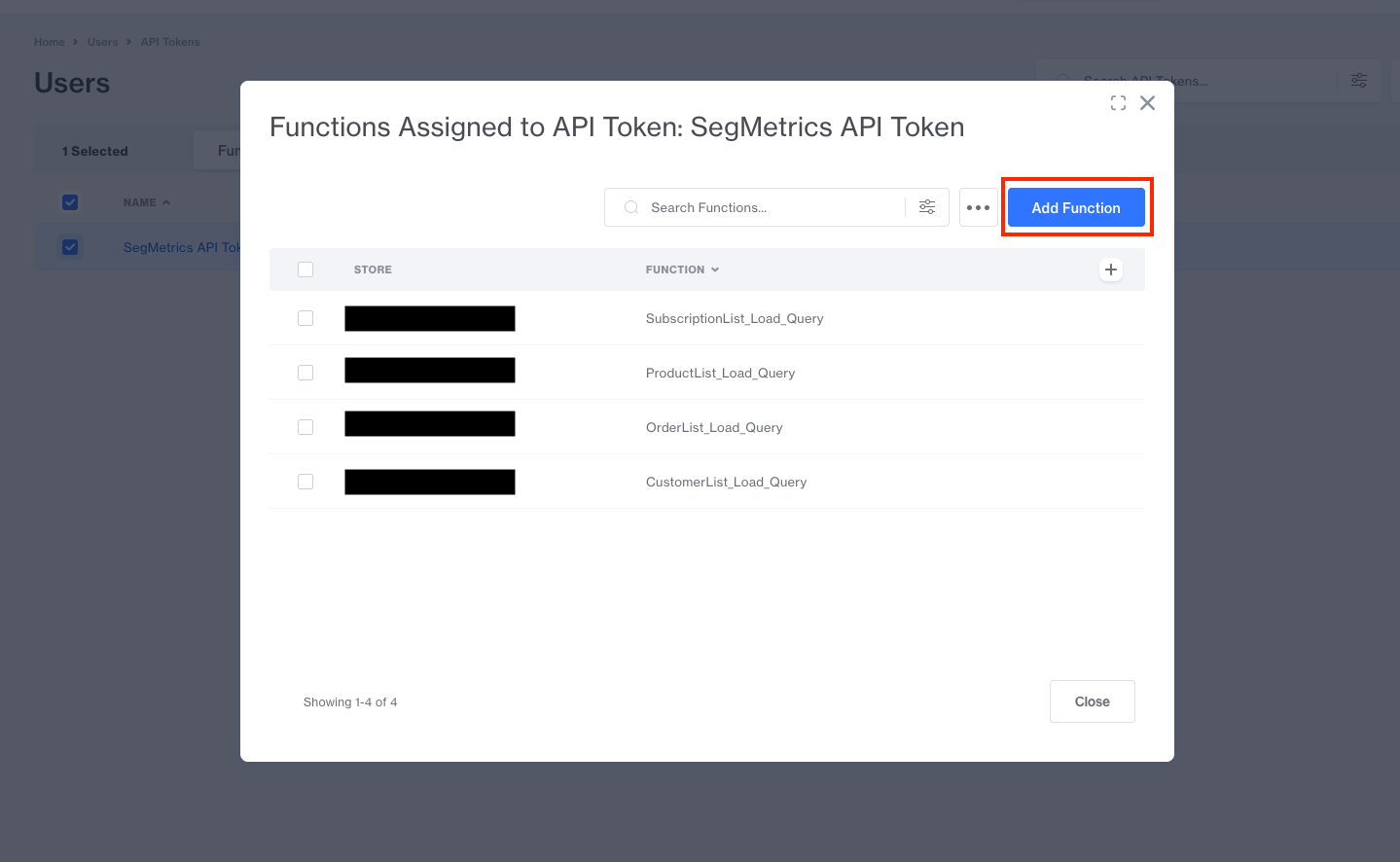
On the API Token page, select your newly created API token and click on "Functions". Then, click on "Add Functions" and add the following function permissions for your store:
- ProductList_Load_Query
- SubscriptionList_Load_Query
- OrderList_Load_Query
- CustomerList_Load_Query
These permissions allow SegMetrics to access your product, subscription, order, and customer data from Miva.
Step 3: Add Your API Credentials to SegMetrics
You'll need your Signature Key, Endpoint URL, Access Token, and Store ID to connect your Miva account to SegMetrics.
Locate Your API Credentials in Miva
- In your Miva admin, navigate to Users > API Tokens
- Select your SegMetrics API token
- Copy the following information:
- Endpoint URL: Found under your store's domain settings (format: https://www.yourdomain.com/mm5/json.mvc)
- Access Token: The token string displayed on the API token page
- Store ID: Your Miva store code
- Signature Key: The key displayed on the API token page
Connect in SegMetrics
- Log in to your SegMetrics account
- Navigate to Integrations from the main menu
- Click Add Integration
- Locate and select Miva from the list of available integrations
- Enter your Miva credentials:
- Endpoint URL: https://www.storefront.com/mm5/json.mvc (use your actual store domain)
- Access Token: Paste your Access Token from Miva
- Store ID: Enter your Miva store code (e.g., "my_store")
- Signature Key: Paste your Signature Key from Miva
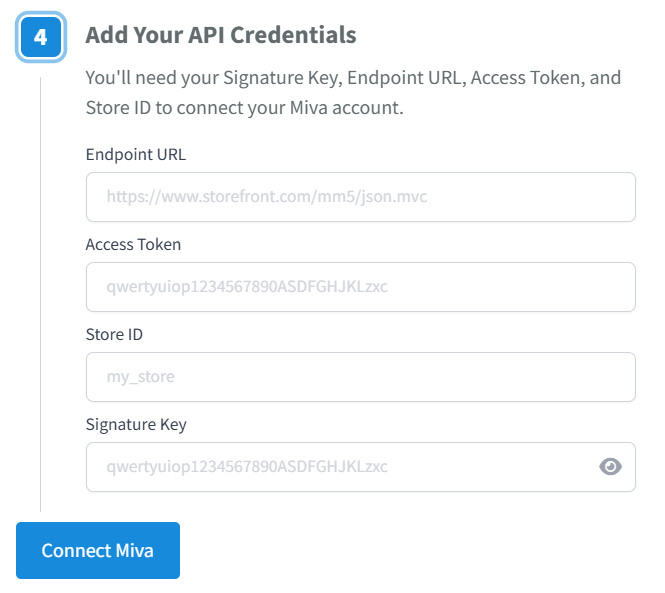
- Click Connect Miva to establish the connection
- SegMetrics will verify your credentials and begin importing your historical order data
Important: Matching Revenue to Contacts
To see revenue and conversion data in SegMetrics, you must connect a CRM or ESP in addition to Miva. SegMetrics matches invoices from Miva to email addresses and contacts from your CRM/ESP integration.
Without a connected CRM or ESP, SegMetrics cannot attribute revenue to specific marketing campaigns or customer journeys. Make sure you have integrated at least one of the following:
- Email Service Providers (ActiveCampaign, Drip, Klaviyo, etc.)
- CRM platforms (HubSpot, Salesforce, etc.)
Once both integrations are active, SegMetrics will automatically match Miva orders to contacts based on email addresses.
How to Use Miva Data in SegMetrics
Miva functions as a revenue source in SegMetrics, providing order and subscription data that appears across your reports. This data appears in SegMetrics reports as follows:
- Acquisition Reports: Track NEW customers only - contacts who made their first purchase through Miva
- Nurture Reports: Track customers who received tags or list additions in your CRM/ESP after making a purchase
- Engagement Reports: Track customers who interacted with your website after becoming Miva customers
- Orders Reports: Track ALL revenue regardless of order status - includes completed, pending, and refunded orders from Miva
- Subscriptions Reports: Track customers who started subscriptions or recurring billing through Miva
Note: What SegMetrics considers a subscriber or subscription may vary slightly compared to Miva's definition. SegMetrics identifies subscriptions based on recurring billing patterns and subscription-specific order attributes.
Frequently Asked Questions
Q: How far back does SegMetrics import historical data from Miva?
A: SegMetrics typically imports historical order data from the past 12-24 months, depending on your account settings and data volume. Contact support if you need to adjust the historical import timeframe.
Q: Will SegMetrics track both B2B and B2C transactions from Miva?
A: Yes, SegMetrics tracks all order types from Miva, including both B2B wholesale orders and B2C direct-to-consumer purchases as long as there is an email that can be matched to one in your ESP/CRM.
Q: What happens if a customer email in Miva doesn't match my CRM/ESP?
A: Orders with email addresses that don't exist in your connected CRM/ESP will appear in your revenue reports but won't be attributed to specific campaigns or customer journeys until the contact is added to your CRM/ESP.
Q: Does SegMetrics track refunds and cancelled orders from Miva?
A: Yes, SegMetrics tracks all order status changes including refunds, cancellations, and modifications. These will be reflected in your Orders Reports.
Q: How long does it take for new Miva orders to appear in SegMetrics?
A: New orders typically appear in SegMetrics within 6-10 hours of being placed in Miva, depending on sync frequency of your SegMetrics plan.