
Beehiiv
Beehiiv is a newsletter platform built for growth, helping creators build, publish, and monetize their newsletters. By integrating Beehiiv with SegMetrics, you can track subscriber engagement, analyze email performance, and understand how your newsletter content drives conversions across your entire customer journey.
Note: This integration does not provide tag dates. SegMetrics will record the date a tag was first seen rather than the date it was originally applied.
Step 1: Create Your API Key in Beehiiv
Before connecting Beehiiv to SegMetrics, you'll need to create an API key in your Beehiiv account. For detailed instructions, please refer to Beehiiv's API documentation.
Access the API Settings
- Log in to your Beehiiv account
- Click on Settings in the left navigation menu
- Select API under the Workspace Settings section
- In the API Keys section, click Create New API Key
Create and Save Your API Key
- A modal will appear prompting you to name your API key
- Enter a descriptive name such as "SegMetrics Integration" for future reference
- Click Create New Key
- You'll receive a success message stating "API Key created"
- Important: Copy and save your API key immediately - this is the only time you'll be able to see it
- After saving the key in a secure location, click I've saved the key
Step 2: Connect Beehiiv to SegMetrics
Name Your Integration
- Log in to your SegMetrics account
- Navigate to Integrations from the main menu
- Click Add Integration
- Locate and select Beehiiv from the list of available integrations
- Enter a nickname for this integration (e.g., "beehiiv") to easily identify it in SegMetrics
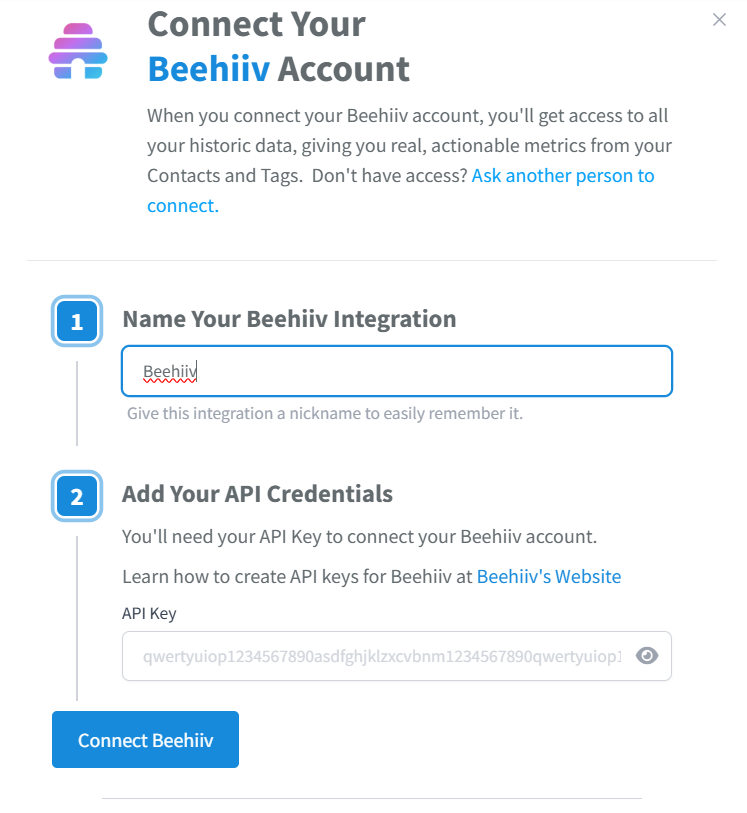
Add Your API Key
- In the Add Your API Credentials section, paste your beehiiv API Key into the API Key field
- Learn how to create API keys for beehiiv at beehiiv's Website
- Click Connect beehiiv to establish the connection
Verify the Connection
- SegMetrics will verify your API key and begin importing your subscriber data. Make sure you have full permissions.
- Verify that the Beehiiv integration shows as Connected on your Integrations page
- SegMetrics will automatically sync contact information, subscription status, and engagement data
How to Use Beehiiv Data in SegMetrics
Beehiiv functions as an email service provider (ESP) in SegMetrics, providing subscriber and engagement data that appears across your reports. This data appears in SegMetrics reports as follows:
- Acquisition Reports: Track newly created contacts who subscribed to your Beehiiv newsletter
- Nurture Reports: Track contacts who received tags or list additions within Beehiiv
- Engagement Reports: Track contacts who visited pages or engaged with your newsletter emails (opens, clicks)
- Orders Reports: Track contacts who made purchases after engaging with your Beehiiv content
- Subscriptions Reports: Track contacts who started subscriptions after newsletter engagement
Beehiiv data can integrate with your revenue sources to provide complete attribution, showing how newsletter engagement influences purchasing behavior and customer lifetime value.
Frequently Asked Questions
Q: How far back does SegMetrics import historical subscriber data from Beehiiv?
A: SegMetrics typically imports historical subscriber data from the past 12-24 months, depending on your account settings and data volume. Contact support if you need to adjust the historical import timeframe.
Q: Will SegMetrics track email opens and clicks from my Beehiiv newsletters?
A: No SegMetrics does not track email open rates. But it does track when the link within an email is clicked. The SegMetrics pixel is located on your webpages, so its only when a user hits the page that the pixel can begin tracking.
Q: What happens if I can't find my API key after creating it?
A: Beehiiv displays the API key only once immediately upon creation for security reasons. If you didn't copy it, you'll need to create a new API key to continue.
Q: Can I connect multiple Beehiiv accounts to SegMetrics? A: You can only connect one Beehiiv account per SegMetrics account. If you need to track data from multiple Beehiiv accounts, you would need separate SegMetrics accounts for each one.