
Userlist
Connect Userlist with Segmetrics to sync user activity, tags, and email engagement data with your revenue metrics. This integration helps you understand how lifecycle emails and behavioral triggers influence conversions, subscriptions, and overall funnel performance.
Step 1: Access Integrations in Segmetrics
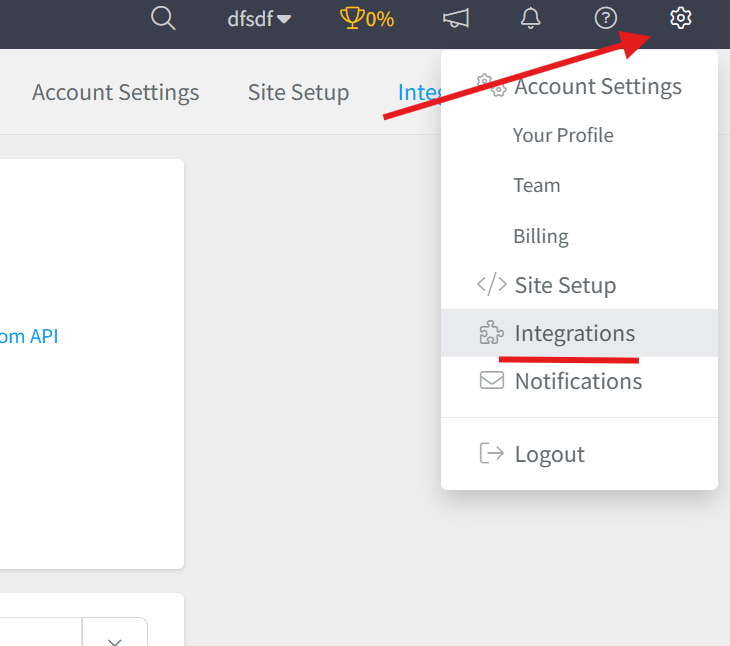
- Log in to your Segmetrics account.
- From your dashboard, click Settings.
- Navigate to Integrations.
Step 2: Select the Userlist Integration
- Browse or search for Userlist in the integrations list.
- Click on the Userlist Integration.
- Give your integration a clear name.

Step 3: Configure the Webhook Integration in Userlist
To connect Userlist with Segmetrics:
- Log in to Userlist and go to Settings → Integrations.
- Find SegMetrics and click Add SegMetrics.
- In the SegMetrics Endpoint field, paste:
https://import.segmetrics.io/aZrYxn/
- In the SegMetrics Secret field, paste your SegMetrics API Key:
lzvsn6prviga5wiathhbv9
- Click Save Changes.
Once saved, webhook data will begin syncing to SegMetrics automatically.
Frequently Asked Questions:
Q1: What data does the Userlist integration sync with SegMetrics? Connecting Userlist to SegMetrics syncs user activity, tags, and email engagement data with your revenue metrics, helping you understand how lifecycle emails and behavioral triggers influence conversions, subscriptions, and overall funnel performance.
Q2: How do I set up the webhook connection in Userlist? Log in to Userlist and go to Settings → Integrations, find SegMetrics, and click Add SegMetrics. Paste your SegMetrics Endpoint URL into the SegMetrics Endpoint field and your SegMetrics API Key into the SegMetrics Secret field, then click Save Changes.
Q3: Where do I find my SegMetrics Endpoint and API Key? Your SegMetrics Endpoint URL and API Key are provided directly in the Userlist integration setup screen within SegMetrics. Copy and paste them into the corresponding fields in Userlist to complete the connection.
Q4: How will I know when the integration is working? Once you click Save Changes in Userlist, webhook data will begin syncing to SegMetrics automatically. You can verify the connection is active by checking for incoming user activity and engagement data appearing in your SegMetrics dashboard.