
Easy Pay Direct
Connect your Easy Pay Direct account to Segmetrics to sync your payment and transaction data for accurate revenue tracking. This integration allows you to connect processed payments to your leads, funnels, and campaigns
Step 1: Access Integrations in Segmetrics
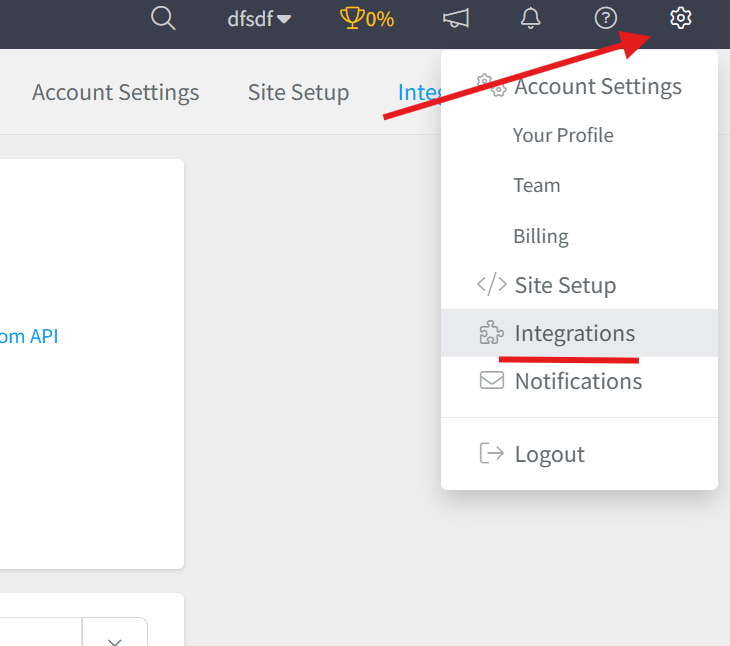
- Log in to your Segmetrics account.
- From your dashboard, click Settings.
- Navigate to Integrations.
Step 2: Select the Easy Pay Direct Integration
- Browse or search for Easy Pay Direct in the integrations list.
- Click on the Easy Pay Direct Integration.
- Give your integration a clear name.

Step 3: Add Your API Security Key
To connect your Easy Pay Direct account, you’ll need your API Security Key.
- Log in to your Easy Pay Direct Merchant Control Panel.
- Navigate to Settings → Security Keys.
- Generate a new key if needed.
Step 4: Add the API Key in Segmetrics
Copy your API Security Key and paste it into the required field in SegMetrics to complete the connection:

Frequently Asked Questions:
Q1: What data does the Easy Pay Direct integration sync with SegMetrics? Connecting Easy Pay Direct to SegMetrics syncs your payment and transaction data, allowing you to link processed payments directly to your leads, funnels, and campaigns for more accurate revenue tracking.
Q2: Where do I find my Easy Pay Direct API Security Key? Log in to your Easy Pay Direct Merchant Control Panel and navigate to Settings → Security Keys. From there you can copy an existing key or generate a new one if needed.
Q3: How do I complete the connection between Easy Pay Direct and SegMetrics? Once you have your API Security Key, go to Settings → Integrations in SegMetrics, select the Easy Pay Direct integration, give it a clear name, and paste your API Security Key into the required field to finalize the connection.
Q4: Why should I connect Easy Pay Direct to SegMetrics? The integration bridges your payment data with your marketing data, giving you a clearer picture of which leads, funnels, and campaigns are generating actual revenue, rather than just tracking clicks or signups in isolation.