
Chargebee
Connect your Chargebee account to Segmetrics to sync your subscription and billing data for accurate recurring revenue tracking. This integration allows you to monitor MRR, subscription performance, churn, and customer lifecycle metrics
Step 1: Access Integrations in Segmetrics
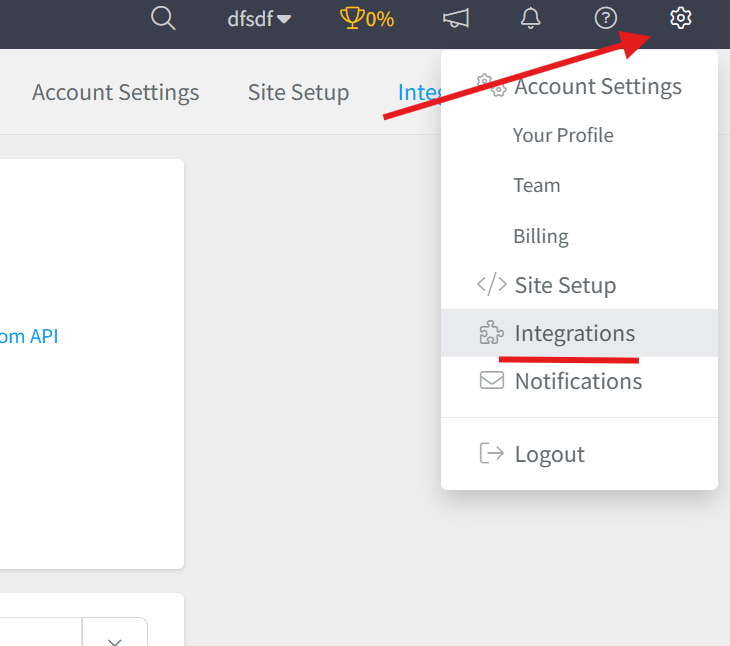
- Log in to your Segmetrics account.
- From your dashboard, click Settings.
- Navigate to Integrations.
Step 2: Select the Chargebee Integration
- Browse or search for Chargebee in the integrations list.
- Click on the Chargebee Integration.
- Give your integration a clear name.

Step 3: Add Your API Details for Chargebee
To connect Chargebee with Segmetrics, you’ll need your Chargebee Site name and a Read-Only API Key.
- Log in to Chargebee and navigate to Settings → API Keys.
- Follow the instructions under Creating an API Key.
- Create a Read Only key.
- Set permissions to Allow All.
- Name the key something related to SegMetrics for future reference.
- Copy your Site Name and the newly created API Key, then paste them into the corresponding fields in SegMetrics to complete the connection.
Refer to the official Chargebee API documentation for detailed instructions:
https://www.chargebee.com/docs/2.0/api_keys.html
Step 4: Connect your Chargebee account with Segmetrics
Add youur Chargebee site and the generated key:

Frequently Asked Questions:
Q1: What data does the Chargebee integration sync with SegMetrics? Connecting Chargebee to SegMetrics syncs your subscription and billing data, allowing you to track MRR, subscription performance, churn, and customer lifecycle metrics all in one place.
Q2: How do I find my Chargebee Site Name and API Key? Log in to your Chargebee account and go to Settings → API Keys. From there, create a Read-Only API key with Allow All permissions and name it something recognizable (such as "SegMetrics") for easy reference. Your Site Name can also be found in the same area. For detailed instructions, refer to the official Chargebee API documentation.
Q3: Why does the API key need to be Read-Only? A Read-Only API key ensures that SegMetrics can pull your billing and subscription data from Chargebee without the ability to modify or delete any records, keeping your Chargebee data secure.
Q4: How do I complete the connection between Chargebee and SegMetrics? Once you have your Chargebee Site Name and API Key, navigate to Settings → Integrations in SegMetrics, select the Chargebee integration, and paste both values into their corresponding fields to finalize the connection.