
SureCart
Connect SureCart to SegMetrics to unlock deeper insights, accurate revenue attribution, and full customer journey tracking. Gain clarity on which products, checkouts, and campaigns drive the most revenue for your business.
Step 1: Access Integrations in Segmetrics
- Log in to your Segmetrics account.
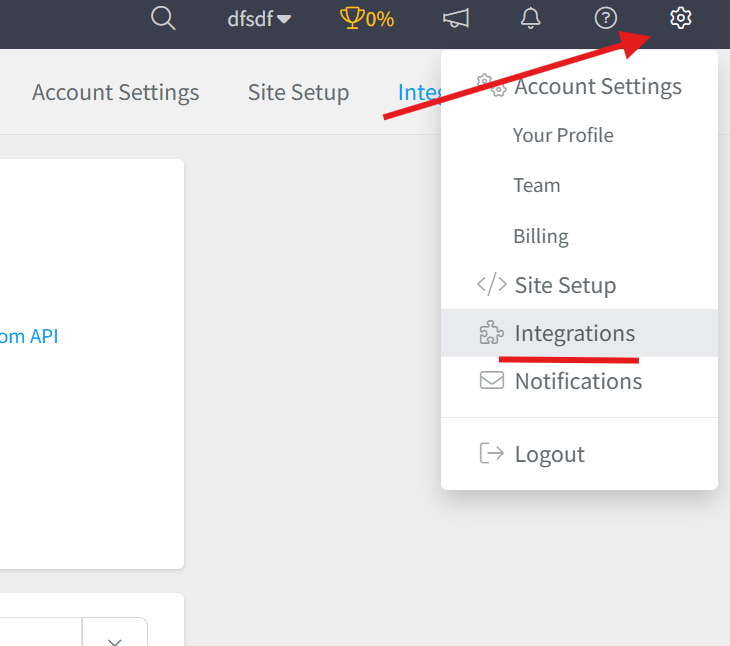
- From your dashboard, click Settings.
- Navigate to Integrations.
Step 2: Select the SureCart Integration
- Browse or search for SureCart in the integrations list.
- Click on the SureCart Integration.
- Give your integration a clear name.

Step 3: Retrieve Your API Credentials from SureCart
- Log in to your SureCart account at app.surecart.com.
- From your SureCart dashboard, click on Settings in the left menu.
- Navigate to the API section.
- Click on the Secret Token tab.
- If you don't have an existing token, click + New API Token to create one.
- Give your token a descriptive name (e.g., "SegMetrics Integration").
- Click on your API token entry to reveal the token.
- Copy the displayed API Token.
Important: Store this token securely. It provides access to your store and should not be shared publicly.
Then Paste Credentials into SegMetrics:
- Return to your SegMetrics integration setup window.
- Paste the API Token into the designated field.
- Click Connect or Authorize to establish the connection.

Frequently Asked Questions
Q: What are the benefits of connecting SureCart to SegMetrics?
A. Connecting SureCart to SegMetrics gives you deeper insights into your sales funnels, accurate revenue attribution, and full customer journey tracking, helping you understand which products, checkouts, and campaigns drive the most revenue for your business.
Q: What API credentials do I need to connect SureCart to SegMetrics?
A. You'll need your API Token (Secret Token) from your SureCart account. This can be found by logging in to SureCart at app.surecart.com and navigating to Settings → API → Secret Token tab.
Q: How do I complete the connection between SureCart and SegMetrics?
A. Once you have your SureCart API Token, go to Settings → Integrations in SegMetrics, select the SureCart integration, give it a clear name, paste in your API Token into the corresponding field, then click Connect or Authorize to finalize the setup.
Q: What can I track once SureCart is connected to SegMetrics?
A. With the integration active, you can track how your SureCart sales tie directly to marketing campaigns, monitor customer journeys from first interaction through purchase, analyze product performance, and gain clearer attribution across your funnels and revenue streams.
Q: Can I use the same SureCart API token for multiple integrations?
A. Yes, you can use the same API token to connect SureCart to multiple platforms or tools. However, for better security and tracking, it's recommended to create separate tokens for different integrations so you can easily identify and revoke access if needed.