
Lawmatics
Connect Lawmatics to SegMetrics to unlock deeper insights, accurate revenue attribution, and full client journey tracking. Gain clarity on which marketing channels, intake forms, and campaigns drive the most qualified leads and conversions for your law firm.
Note: This integration does not provide tag dates. SegMetrics will record the date a tag was first seen rather than the date it was originally applied.
Step 1: Access Integrations in Segmetrics
- Log in to your Segmetrics account.
- From your dashboard, click Settings.
- Navigate to Integrations.
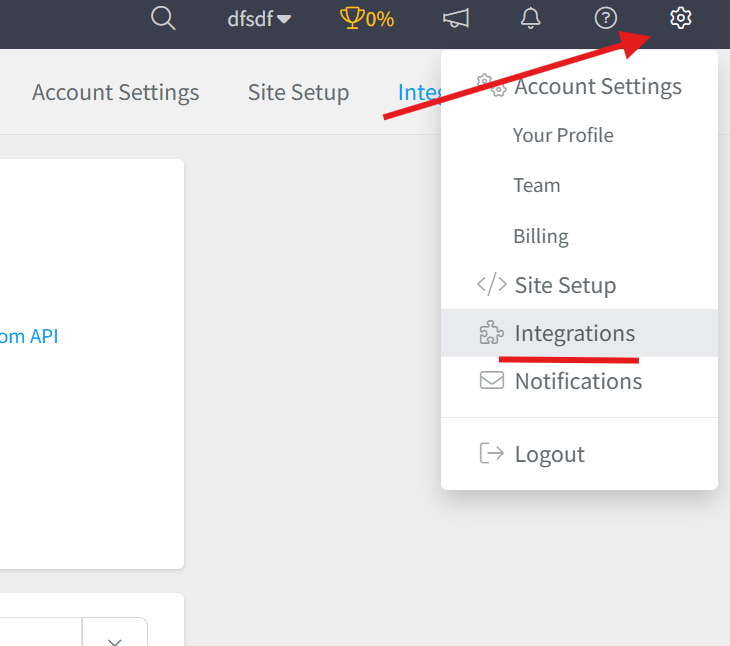
Step 2: Select the Lawmatics Integration
- Browse or search for Lawmatics in the integrations list.
- Click on the Lawmatics Integration.
- Give your integration a clear name.

Step 3: Connect Your Lawmatics Account to SegMetrics
- From your SegMetrics dashboard, navigate to Settings → Integrations.
- Search for Lawmatics in the list of available integrations.
- Click on the Lawmatics integration card.
- Click the Connect Lawmatics button to establish the connection.
- You will be redirected to Lawmatics to authorize the connection.
- Log in to your Lawmatics account if prompted.
- Review the permissions and click Authorize or Allow Access to grant SegMetrics access to your Lawmatics data.
- You will be redirected back to SegMetrics, and your integration status will show as Connected.

Note: The connection process uses OAuth authentication, which securely links your accounts without requiring you to manually copy and paste API credentials.
Frequently Asked Questions
Q: What are the benefits of connecting Lawmatics to SegMetrics?
A: Connecting Lawmatics to SegMetrics gives you deeper insights into your client acquisition funnels, accurate revenue attribution, and full client journey tracking, helping you understand which marketing channels, intake forms, and campaigns drive the most qualified leads and conversions for your law firm.
Q: What credentials do I need to connect Lawmatics to SegMetrics?
A: You don't need to manually retrieve any API credentials. The integration uses OAuth authentication, which means you simply click the "Connect Lawmatics" button in SegMetrics and authorize the connection through the Lawmatics login screen. The authentication is handled automatically and securely.
Q: How do I complete the connection between Lawmatics and SegMetrics?
A: Go to Settings → Integrations in SegMetrics, select the Lawmatics integration, click the "Connect Lawmatics" button, log in to your Lawmatics account when redirected, authorize the connection, and you'll be returned to SegMetrics with the integration successfully connected.
Q: What can I track once Lawmatics is connected to SegMetrics?
A: With the integration active, you can track how your Lawmatics client intake and lead management tie directly to revenue, monitor prospect journeys from initial contact through case retention, analyze which lead sources convert best, and gain clearer attribution across your marketing channels and client acquisition funnels.
Q: Can I disconnect and reconnect Lawmatics if needed?
A: Yes, you can disconnect the Lawmatics integration at any time from the Integrations page in SegMetrics. If you need to reconnect, simply click "Connect Lawmatics" again and re-authorize the connection. Your historical data will be preserved, and new data will resume syncing once reconnected.