
Mews
Connect Mews to SegMetrics to unlock deeper insights, accurate revenue attribution, and full guest journey tracking. Gain clarity on which booking channels, rate strategies, and property operations drive the most revenue and guest satisfaction for your hospitality business.
Step 1: Access Integrations in SegMetrics
- Log in to your SegMetrics account.
- From your dashboard, click Settings.
- Navigate to Integrations.
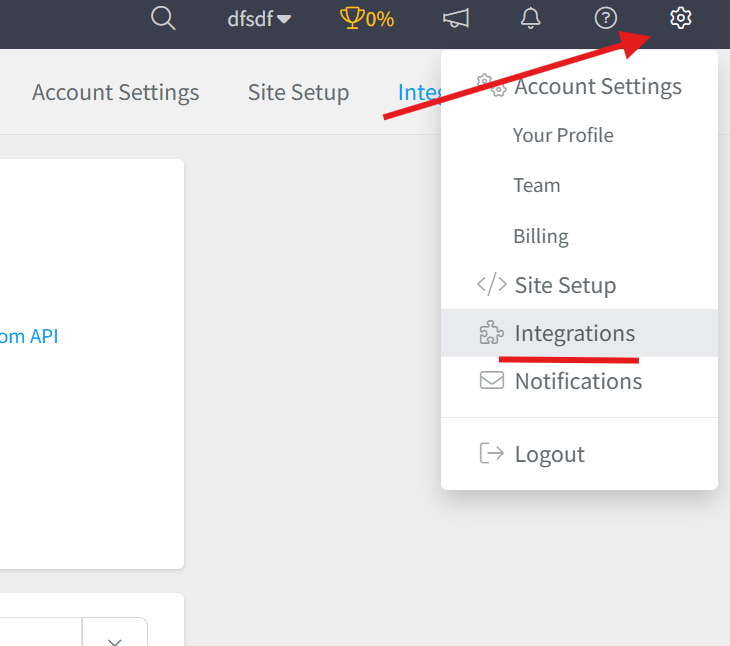
Step 2: Select the Mews Integration
- Browse or search for Mews in the integrations list.
- Click on the Mews Integration.
- Give your integration a clear name.

Step 3: Retrieve Your Access Token from Mews
To connect Mews to SegMetrics, you'll need your Access Token from Mews.
Finding Your Access Token
- Log in to your Mews Operations dashboard.
- From the navigation menu, go to Main menu → Marketplace.
- Click on My subscriptions.
- Find the SegMetrics integration in your list of connected integrations (or the integration you're setting up).
- Click on the integration to open its settings.
- Locate and copy the Access Token displayed in the integration settings.
Alternative Method: If the integration partner (SegMetrics) has already connected to your property, they may provide you with the Access Token directly. You can also find it by navigating to the specific integration's settings page in your Marketplace subscriptions.
Important: Store this Access Token securely. It provides access to your property data in Mews and should not be shared publicly. For security reasons, do NOT share tokens via email or regular chat. If you need to share the token, use a secure messaging tool like onetimesecret.com.
Understanding Mews Access Tokens
An Access Token is unique to each integration added to your Marketplace subscriptions. It identifies your specific property or enterprise and allows authorized applications to read and write data in your Mews account. Each integration partner will have their own unique Access Token for your property.
Step 4: Connect Mews to SegMetrics
- Return to your SegMetrics integration setup window.
- Paste your Access Token into the designated field.
- Click Connect or Authorize to establish the connection.
- SegMetrics will verify your credentials and connect to your Mews property.

Once connected, SegMetrics will begin syncing your Mews data, including reservation information, guest profiles, revenue data, and property performance metrics.
Frequently Asked Questions
Q: What are the benefits of connecting Mews to SegMetrics?
A: Connecting Mews to SegMetrics gives you deeper insights into your hospitality operations, accurate revenue attribution, and full guest journey tracking, helping you understand which booking channels, room types, rate strategies, marketing campaigns, and operational workflows drive the most revenue, occupancy, and guest satisfaction for your property.
Q: What API credentials do I need to connect Mews to SegMetrics?
A: You'll need your Access Token from your Mews account. This can be found by logging in to Mews Operations, navigating to Main menu → Marketplace → My subscriptions, selecting the SegMetrics integration, and copying the Access Token from the integration settings.
Q: How do I complete the connection between Mews and SegMetrics?
A: Once you have your Mews Access Token, go to Settings → Integrations in SegMetrics, select the Mews integration, give it a clear name, paste in your Access Token into the corresponding field, then click Connect or Authorize to finalize the setup.
Q: What can I track once Mews is connected to SegMetrics?
A: With the integration active, you can track how your booking channels tie directly to revenue, monitor guest journeys from reservation through checkout, analyze room type and rate performance, track operational metrics like occupancy and RevPAR, measure the effectiveness of your direct booking engine versus OTAs, and gain clearer attribution across your marketing funnels and revenue streams.
Q: Can I use the same Mews Access Token for multiple integrations?
A: No, each integration that connects to your Mews property receives its own unique Access Token. This is a security feature that allows you to control and revoke access to specific integrations independently. If you need to connect multiple properties or applications, each will require its own Access Token generated from your Mews Marketplace subscriptions.