
Sticky.io
Connect Sticky.io to SegMetrics to unlock deeper insights, accurate revenue attribution, and full customer journey tracking. Gain clarity on the KPIs that matter most in your subscription and ecommerce funnels.
Step 1: Access Integrations in SegMetrics
- Log in to your SegMetrics account.
- From your dashboard, click Settings.
- Navigate to Integrations.
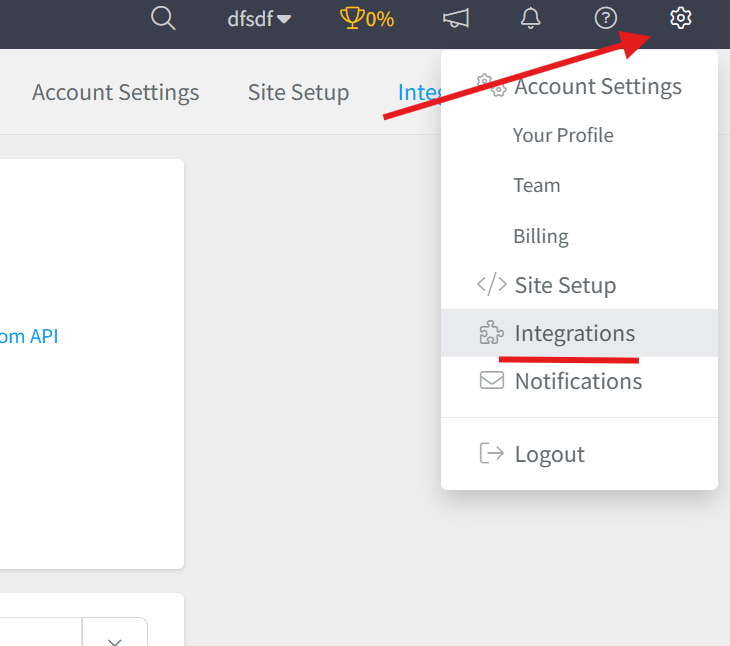
Step 2: Select the Sticky.io Integration
- Browse or search for Sticky.io in the integrations list.
- Click on the Sticky.io Integration.
- Give your integration a clear name.

Step 3: Generate an API Account in Sticky.io
You'll need to generate an API Account in your Sticky.io Account Settings.
- Log in to your Sticky.io account.
- Navigate to Account Settings → API Accounts.
- Generate a new API account.
- Ensure you grant the account all GET permissions under the API v2 section.
- Also grant order_find and order_view permissions under the Membership section.
⚠️ Important: For your account's security, your credentials will only be displayed once. Store your API Username and Password in a safe place before navigating away.
Step 4: Locate Your Sticky.io Subdomain
You'll need to copy your subdomain from your Sticky.io Site Dashboard URL.
Example: if your dashboard URL is https://demo.sticky.io/admin , your subdomain is demo.
Step 5: Add Your API Credentials to SegMetrics
Back in SegMetrics, enter the following credentials gathered from Sticky.io:
- Subdomain
- API Username
- API Password
Once entered, click Connect Sticky.io to finalize the setup.

Frequently Asked Questions
Q: What are the benefits of connecting Sticky.io to SegMetrics?
A. Connecting Sticky.io to SegMetrics gives you deeper insights into your subscription and ecommerce funnels, accurate revenue attribution, and full customer journey tracking, helping you focus on the KPIs that matter most, like MRR, LTV, and conversion rates.
Q: What API credentials do I need to connect Sticky.io to SegMetrics?
A. You'll need three things from your Sticky.io account: your Subdomain, API Username, and API Password. These are generated by creating an API Account in your Sticky.io Account Settings.
Q: What permissions does the Sticky.io API account need?
A. The API account must have all GET permissions under the API v2 section, plus order_find and order_view permissions under the Membership section. Without these, SegMetrics won't be able to pull your order and customer data.
Q: How do I complete the connection between Sticky.io and SegMetrics?
A. Once you have your credentials, go to Settings → Integrations in SegMetrics, select the Sticky.io integration, give it a clear name, enter your Subdomain, API Username, and API Password, then click Connect Sticky.io to finalize the setup.
Q: What can I track once Sticky.io is connected to SegMetrics?
A. With the integration active, you can track how your Sticky.io subscription and ecommerce campaigns tie directly to revenue, monitor customer journeys from first touch through conversion and renewal, and gain clearer attribution across your funnels and campaigns.