
Recurpay
Connect Recurpay to SegMetrics to unlock deeper insights, accurate revenue attribution, and full customer journey tracking. Gain clarity on the KPIs that matter most in your subscription funnels.
Step 1: Access Integrations in SegMetrics
- Log in to your SegMetrics account.
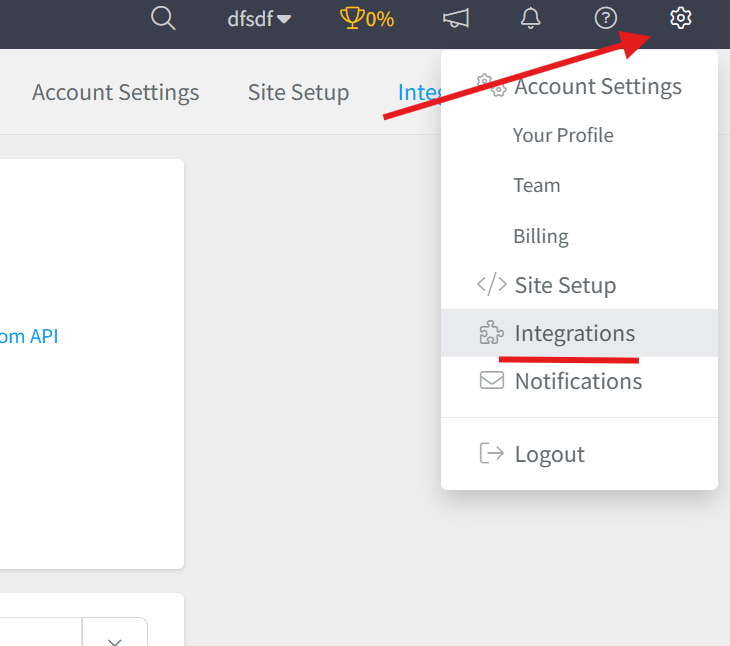
- From your dashboard, click Settings.
- Navigate to Integrations.
Step 2: Select the Recurpay Integration
- Browse or search for Recurpay in the integrations list.
- Click on the Recurpay Integration.
- Give your integration a clear name.

Step 3: Generate an API Access Token in Recurpay
Recurpay uses a custom app to generate the access token needed for third-party integrations.
- Log in to your Recurpay dashboard.
- Navigate to Settings and open the Integrations section.
- Select the option to build or create a Custom App.
- Enter the required details and create the app.
- Copy the API Access Token generated for the app.
Note: Store your access token in a safe place before navigating away, as it may only be displayed once.
Step 4: Add Your API Credentials to SegMetrics
- Return to SegMetrics and paste your Recurpay API Access Token into the corresponding field.
- Click Connect Recurpay to finalize the setup.

Frequently Asked Questions
Q: What are the benefits of connecting Recurpay to SegMetrics?
A: Connecting Recurpay to SegMetrics gives you deeper insights into your subscription funnels, accurate revenue attribution, and full customer journey tracking, helping you focus on the KPIs that matter most, such as MRR, subscriber retention, and lifetime value.
Q: What credentials do I need to connect Recurpay to SegMetrics?
A: You will need an API Access Token generated from a custom app inside your Recurpay dashboard. Navigate to Settings then Integrations in Recurpay, create a custom app, and copy the token provided.
Q: How do I complete the connection between Recurpay and SegMetrics?
A: Once you have your API Access Token, go to Settings then Integrations in SegMetrics, select the Recurpay integration, give it a clear name, paste in your token, and click Connect Recurpay to finalize the setup.
Q: What can I track once Recurpay is connected to SegMetrics?
A: With the integration active, you can track how your Recurpay subscription activity ties directly to revenue, monitor customer journeys from first touch through conversion and renewal, and gain clearer attribution across your funnels and campaigns.