
BigCommerce
Connect BigCommerce to SegMetrics to unlock deeper insights, accurate revenue attribution, and full customer journey tracking. Gain clarity on the KPIs that matter most in your ecommerce funnels.
Step 1: Access Integrations in SegMetrics
- Log in to your SegMetrics account.
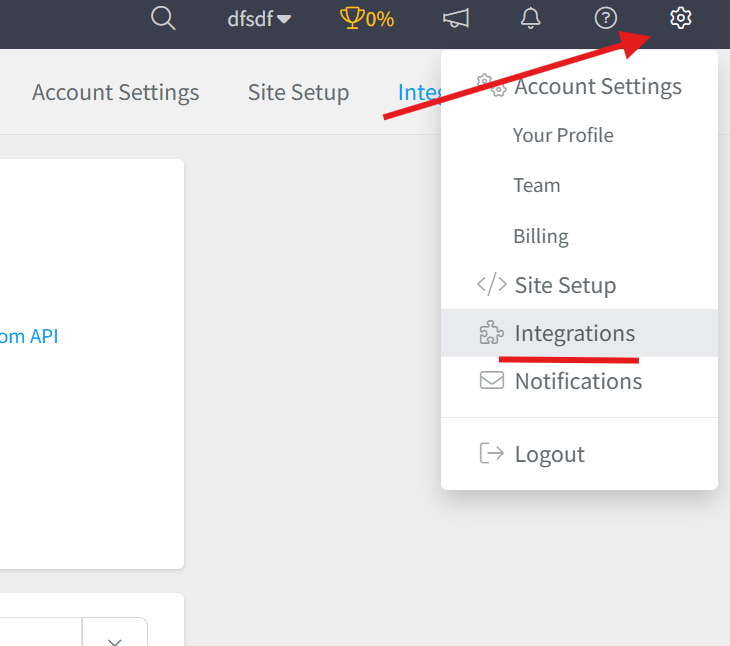
- From your dashboard, click Settings.
- Navigate to Integrations.
Step 2: Select the BigCommerce Integration
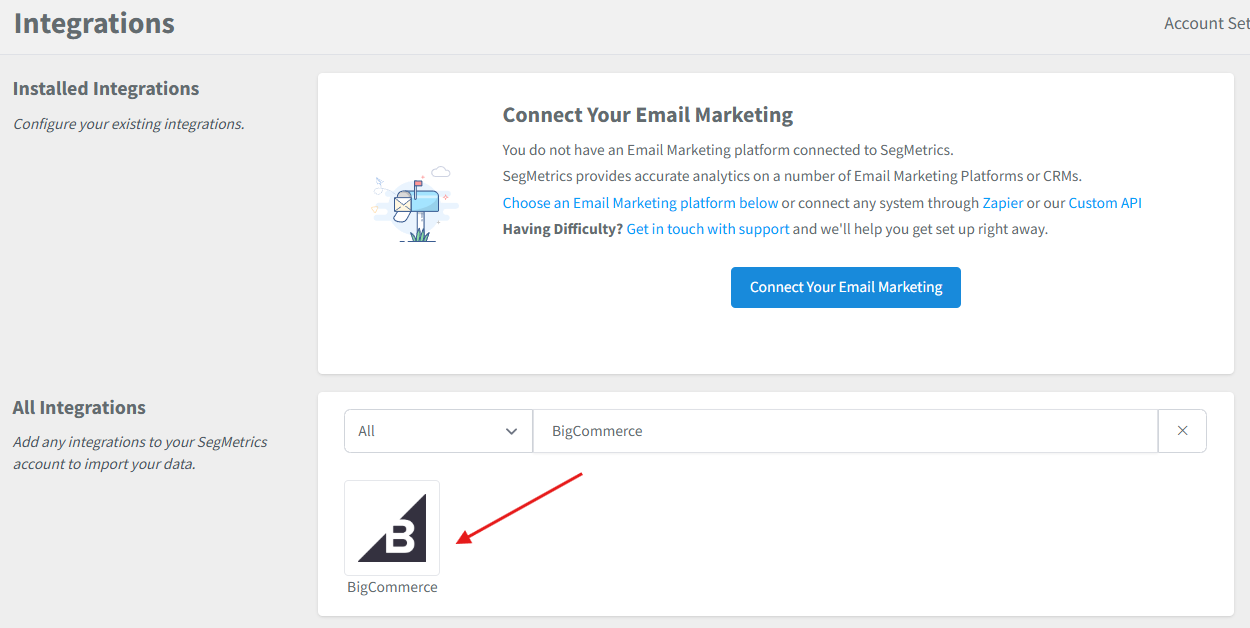
- Browse or search for BigCommerce in the integrations list.
- Click on the BigCommerce Integration.
- Give your integration a clear name.
Step 3: Create a Store API Account in BigCommerce
- Log in to your BigCommerce admin panel.
- Navigate to Advanced Settings then API Accounts then Create API Account.
- Name your Store API Account SegMetrics.
- Under OAuth Scopes, set the following to Read Only:
- Products
- Carts
- Checkouts
- Channel Settings
- Channel Listings
- Content
- Checkout Content
- Customers
- Orders
- Order Transactions
- Click Save.
- Take note of your API Path and Secret Key — store them somewhere safe before navigating away, as the Secret Key will only be shown once.
For additional reference, see BigCommerce's help article on creating API accounts.
Step 4: Add Your API Credentials to SegMetrics
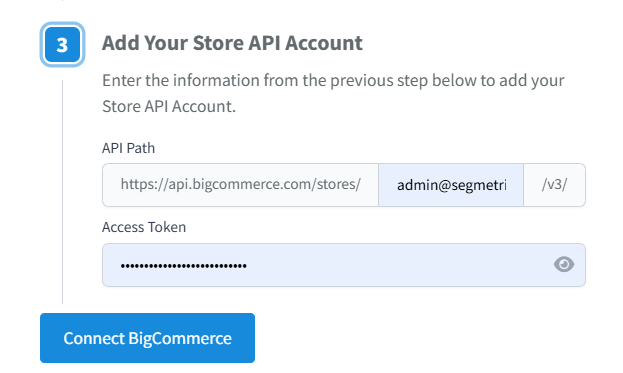
- Return to SegMetrics and enter your API Path and Secret Key into the corresponding fields.
- Click Connect BigCommerce to finalize the setup.
Frequently Asked Questions
Q: What are the benefits of connecting BigCommerce to SegMetrics?
A: Connecting BigCommerce to SegMetrics gives you deeper insights into your ecommerce funnels, accurate revenue attribution, and full customer journey tracking, helping you understand which marketing efforts are driving orders, repeat purchases, and long-term customer value.
Q: What credentials do I need to connect BigCommerce to SegMetrics?
A: You will need an API Path and a Secret Key, both generated when you create a Store API Account in BigCommerce under Advanced Settings then API Accounts. Be sure to save the Secret Key before navigating away, as it is only displayed once.
Q: What OAuth scopes does the BigCommerce API account need?
A: The API account requires Read Only access for the following scopes: Products, Carts, Checkouts, Channel Settings, Channel Listings, Content, Checkout Content, Customers, Orders, and Order Transactions. Without these, SegMetrics will not be able to pull your store data correctly.
Q: How do I complete the connection between BigCommerce and SegMetrics?
A: Once you have your credentials, go to Settings then Integrations in SegMetrics, select the BigCommerce integration, give it a clear name, enter your API Path and Secret Key into the corresponding fields, and click Connect BigCommerce to finalize the setup.
Q: What can I track once BigCommerce is connected to SegMetrics?
A: With the integration active, you can track how your BigCommerce orders and store activity tie directly to revenue, monitor customer journeys from first touch through purchase and repeat orders, and gain clearer attribution across your funnels and campaigns.