
SendFox
Connect your SendFox account to SegMetrics to track subscriber activity, attribute revenue to email campaigns, and build a complete picture of your list performance.
Step 1: Access Integrations in Segmetrics
- Log in to your Segmetrics account.
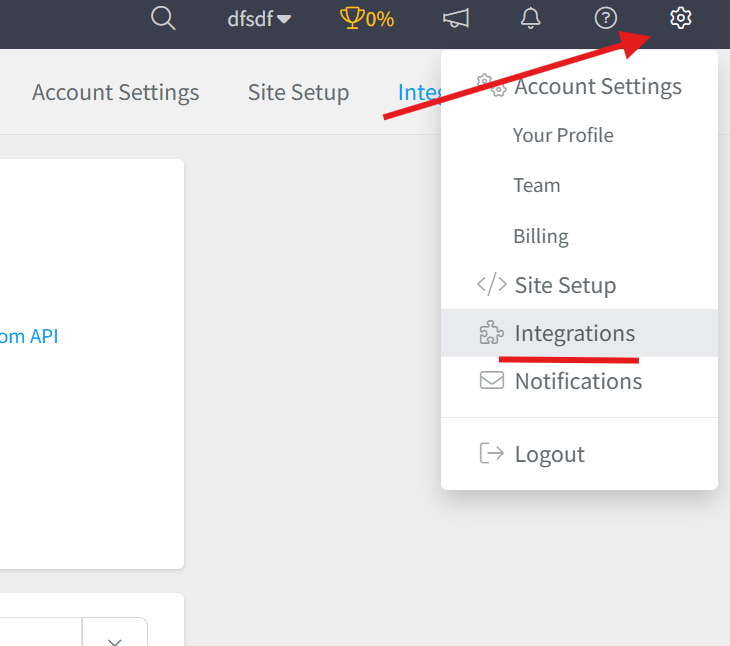
- From your dashboard, click Settings.
- Navigate to Integrations.
Step 2: Select the SendFox Integration
- Browse or search for SendFox in the integrations list.
- Click on the SendFox Integration.
- Give your integration a clear name.

Step 3: Add Your OAuth Access Token
You'll need a personal access token to connect your SendFox account. Generate one in your SendFox account settings.
- Go to sendfox.com and navigate to your account settings to locate your Personal Access Token.
- Copy the token to your clipboard, you will paste it into SegMetrics in the next step.
- Return to the SendFox integration setup in SegMetrics and paste your token into the OAuth Access Token field.
- Save and confirm the connection.

What Data Gets Synced
Once connected, SegMetrics continuously syncs the following data from SendFox into your account:
| Data Type | Details | Availability |
|---|---|---|
| Contacts | Subscriber email address, name, and join date | Synced |
| Lists | Which list(s) each contact belongs to | Synced |
| Tags | Tags applied to contacts in SendFox | Synced |
| Unsubscribes | Contact unsubscribe status and date | Synced |
| Campaign Opens / Clicks | Email engagement events per campaign | Not available via API |
Frequently Asked Questions:
Q: How long does the initial sync takes?
The initial sync typically completes within a few minutes for smaller lists. Larger lists with tens of thousands of contacts may take up to 30 minutes. You can check sync status from your SegMetrics Integrations page.
Q: Does SegMetrics sync data from all my SendFox lists?
Yes. Once connected, SegMetrics will sync contacts across all lists in your SendFox account. You can then filter and segment by list within SegMetrics reports.
Q: Will historical subscriber data be imported?
SegMetrics imports your existing subscriber list at the time of connection, so contacts already in SendFox will appear in your account. However, historical revenue attribution data, purchases made before your SegMetrics tracking script was installed, cannot be retroactively matched.
Q: What happens if I regenerate my SendFox API key?
If your API key changes, the integration will stop syncing. You'll need to return to Settings → Integrations → SendFox in SegMetrics, click Edit, and paste in your new API key to restore the connection.
Q: How does SegMetrics attribute revenue to SendFox subscribers?
SegMetrics matches subscribers by email address. When a contact from SendFox visits your site (via a link in a campaign) and makes a purchase, SegMetrics connects that purchase to their SendFox subscriber record, giving you full revenue attribution per list, tag, and campaign.