
DotDigital
Connect your SegMetrics account to DotDigital and pull in all of your historical leads and contact data. You can then use that data to create reports inside SegMetrics.
Connect DotDigital to SegMetrics
First, integrate your DotDigital account with your SegMetrics account
Note: You can connect to a single CRM or Email tool at a time. If you've already connected to a CRM or email tool, you'll need to disconnect from that tool in order to integrate with DotDigital.
- Head over to the Integrations page in your SegMetrics account
- Click on the DotDigital integration
- Enter the following DotDigital account credentials:
- Region
- API Username
-
API Password
Note: You'll need to set up an API User in DotDigital to connect your SegMetrics account. Follow the instructions in DotDigital's documentation to set up your API user.
- Click Connect DotDigital
Once integrated, SegMetrics imports all historical contact information from your DotDigital account.
Build Reports with DotDigital Data
Now that you have DotDigital connected to your SegMetrics account, you can start running reports and using DotDigital data to filter and segment.
For example, run a New Leads report to see the total number of new leads added to your DotDigital account in the last 30 days.
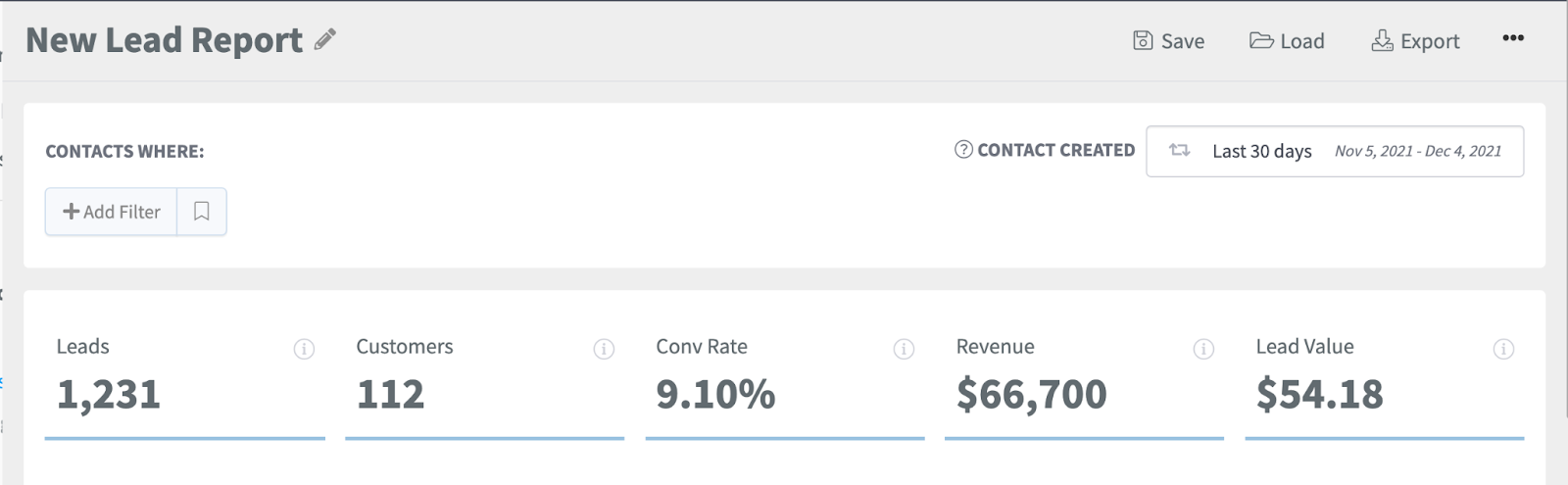
Use the Tags filter to filter your reports by contacts who have been applied a given tag name.
Frequently Asked Questions
Q: How much historical data is synced when I first connect DotDigital to SegMetrics?
A: When you connect a new DotDigital data source, all historical data from your DotDigital account is synced. Once your DotDigital Data Source is connected and actively syncing data, we store the data that's collected in our own database. This allows us to accumulate more data over time as more data syncs are made so that you can report on more historical DotDigital data in your SegMetrics reports.
Q: How do I create an API user in DotDigital?
A: To create an API user, you must be an account owner or a managed user with the "Can manage account" permission enabled. Log in to DotDigital, expand the User menu in the bottom left, go to Settings > Access > API users, and select "NEW USER". The username (email address) is automatically generated, and you'll need to create a password that's at least eight characters long with at least one digit or non-alphanumeric character.
Q: What time zone is DotDigital data synced in?
A: DotDigital data is synced in UTC. SegMetrics reports on your data based on the timezone that you set in your Account Settings.
Q: Do I need the tracking pixel to get the data found in my DotDigital account?
A: The SegMetrics tracking pixel must be installed on all of your web pages so SegMetrics can attach visitor data to any contacts who visit those pages. While SegMetrics can import your DotDigital contact data without the pixel, you won't get the complete customer journey tracking without it installed on your website. To learn how to create a tracking link, check out our URL builder quick walkthrough.
Q: Can I connect multiple CRM or email tools to SegMetrics?
A: No, you can connect to only one CRM or email tool at a time. If you've already connected to another CRM or email tool, you'll need to disconnect from that tool before integrating with DotDigital.