
Customer.io
SegMetrics gives you the ability to analyze your Customer.io data and connect it to other data sources. With that information, you can easily segment that data into your leads, find the automation triggers that convert to customers, understand where your most valuable leads are coming from, and more!
Note: This integration does not provide tag dates. SegMetrics will record the date a tag was first seen rather than the date it was originally applied.
Integration Overview
SegMetrics imports your contacts, custom fields, and tags directly from Customer.io. SegMetrics is kept up to date with the most recent information in your Customer.io account, to make sure you always have access to the information you need.
If you have a payment processor that doesn't connect with Customer.io natively, we can connect that in SegMetrics information together using the email addresses in Customer.io. You don't need to import people in a special way: they just need to be in your Customer.io account!
Connect Customer.io to SegMetrics
- If you haven't already been prompted to connect Customer.io upon setup, click on the gear icon in the top right corner and then click "Integrations"
- Once you're on the Integrations page, select the CRM list and click on Connect next to Customer.io
-
This will open the Activation window, which is where you will be prompted to enter your site ID and confirm API access. If you need help finding them you can click this Customer.io help article
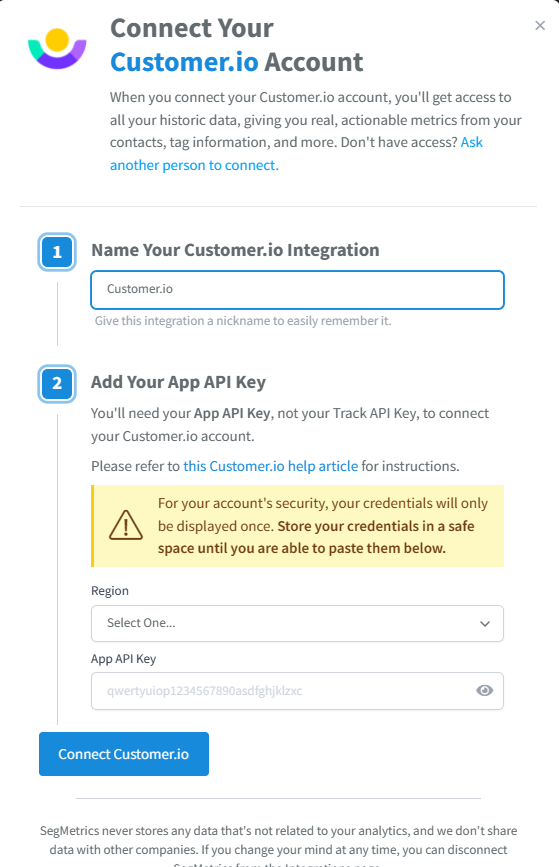
- That's it, you're done! We'll take it from here as it will take some time to import all of your Customer.io data. You will get an email notifying you when it's complete. In the meantime, if you haven't already, make sure you start connecting any of your other integrations such as ad platforms or even other payment processors.
Connect Payment Information
You can integrate your payment processor with SegMetrics. We recommend using whichever payment processor can act as your single source of truth.
Historical Data Sync
When you connect a new Customer.io integration, all historical data from your Customer.io account is synced. This typically includes any tags, lists, contacts, etc. There will of course be no historical click data unless the SegMetrics tracking pixel has already been on your pages. All click data can only date as far back as when the pixel was placed on a website.
Pro Tip: Once Customer.io is connected and actively syncing data, we store the data that's collected in our own database. This allows us to accumulate more data over time as more data syncs are made so that you can report on more historical Customer.io data in your SegMetrics reports.
Set Up Landing Page Tracking
If you are using Customer.io's booking pages, you'll want to install the tracking pixel on those pages as well as any forms. You can test the schedule/opt-in forms using our debugger tool located at the bottom of your settings page.
Frequently Asked Questions
Q: How long does it take for Customer.io data to sync with SegMetrics?
A: Initial sync begins immediately after connection. All historical data from your Customer.io account is imported during the first sync which can take a few hours. Customer.io data is synced in UTC, and SegMetrics reports on your data based on the timezone you set in your Account Settings.
Q: What data is imported from Customer.io?
A: SegMetrics imports your contacts, custom fields, tags, and lists directly from Customer.io. Historical click data will only be available if the SegMetrics tracking pixel was already installed on your pages before the integration (which is most likely wasn't)
Q: Do I need to install tracking pixels to get Customer.io data?
A: For tracking you will need the tracking pixel on your pages to provide detailed information about exactly which links subscribers clicked for ads, email broadcasts, or campaigns. To learn how to create a tracking link, check out our URL builder quick walkthrough.
Q: Can I track opt-ins from Customer.io booking pages?
A: Yes, if you are using Customer.io's booking pages, install the tracking pixel on those pages as well as any forms. You can test the schedule/opt-in forms using our debugger tool located at the bottom of your settings page.
Q: What happens after I connect Customer.io to SegMetrics?
A: After connection, SegMetrics will begin importing all your Customer.io data. You'll receive an email notification when the import is complete. In the meantime, you can connect other integrations such as ad platforms or payment processors to get a complete view of your marketing funnel.