
SamCart
SegMetrics integrates with SamCart to analyze your sales data and connect it to other data sources. This integration enables advanced segmentation, ROI tracking from paid ads, and long-term attribution to purchase behavior.
Integration Overview
SamCart's sales data flows seamlessly into SegMetrics through webhook integration, enabling:
- Long-term ROI tracking from paid advertising campaigns
- Advanced segmentation based on checkout behavior
- Attribution analysis connecting ad spend to actual purchases
- Cross-platform analytics by matching email addresses across your CRM and SamCart
Important Note: SegMetrics matches customers by email address. If a customer's email differs between SamCart and your CRM, their purchase/revenue data will not be connected in SegMetrics.
Step 1: Access Integration Settings
- Click the gear icon in the top right corner of SegMetrics
-
Select Integrations from the dropdown menu
Find SamCart integration by:
- Selecting Payment Processing category
- Searching "SamCart" in the search bar
- Scrolling alphabetically through all integrations
Step 2: Configure SamCart Connection
- Click the SamCart integration to open the connection window
- Name your integration for easy identification
- Enter your SamCart Store Domain (e.g., yourstore.samcart.com)
- Click the blue Connect SamCart button
Step 3: Complete Webhook Setup
The activation window will guide you through the webhook configuration process. SamCart requires webhook integration rather than direct API access.
Follow the on-screen steps including:
- Creating integration rules in SamCart
- Setting up global integration triggers
- Installing the SegMetrics tracking pixel (detailed below)
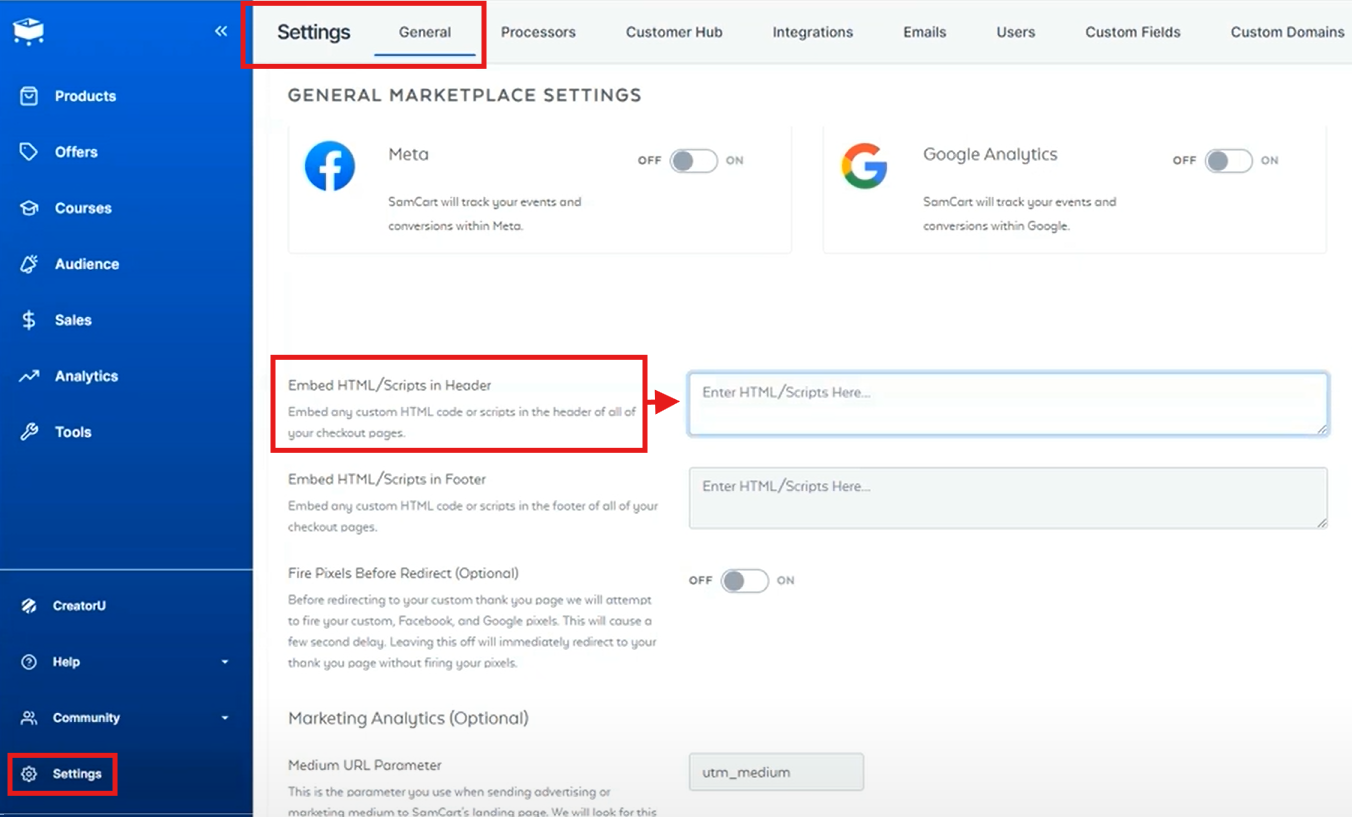
Step 4: Install Tracking Pixel in SamCart
- In your SamCart account, go to Settings > General
- Scroll down to "Embed HTML/Scripts in Header"
- Paste your SegMetrics tracking pixel code in the provided box
- Save your changes
This tracking pixel enables SegMetrics to attribute purchases to the correct traffic sources and campaigns.
Historical Data Import
Webhook Limitation: Since SamCart uses webhooks, no historical data imports automatically.
Manual Import Process:
- Export your historical data from SamCart's orders report as CSV
- In SegMetrics, navigate to Integrations
- Click the three dots next to your SamCart integration
- Select Upload Historical Data
- Choose data type (orders or subscriptions)
- Upload the unmodified SamCart CSV file
- Allow about one hour for processing
Historical data will appear in SegMetrics once the contact exists in your system.
How to Use SamCart Data in SegMetrics
Report Types Available
- Acquisition Reports - NEW customers only
- Nurture Reports - Customers who received tags/list additions
- Engagement Reports - Customers who interacted with website
- Orders Reports - ALL revenue regardless of customer status
- Subscriptions Reports - Customers who started subscriptions
Important Note on Subscription Definitions
What SegMetrics considers a subscriber or subscription may vary slightly compared to SamCart's definitions. SegMetrics uses its own logic to categorize recurring payments and subscription statuses based on the webhook data received.
Frequently Asked Questions
Q: What timezone is SamCart data synced in?
A: SamCart data syncs in UTC. SegMetrics displays reports in the timezone you've set in your Account Settings.
Q: Do I need the tracking pixel to get conversion data?
A: Conversion data comes through the webhook, but the tracking pixel is essential for attribution. Without it, SegMetrics can't connect purchases to traffic sources, campaigns, or customer journeys.
Q: What happens if email addresses don't match between SamCart and my CRM?
A: SegMetrics won't be able to connect the purchase data. Ensure customers use consistent email addresses across all platforms for accurate attribution.
Q: Can I track refunds and subscription cancellations?
A: Yes, SamCart webhooks send refund and cancellation data to SegMetrics, allowing you to track the complete customer lifecycle and calculate accurate metrics.
Q: How quickly does new SamCart data appear in SegMetrics?
A: Webhook data typically appears within a few minutes of the transaction in SamCart. Complex calculations and attribution may take slightly longer to process.