
Kit
SegMetrics gives you the ability to analyze your Kit campaign performance and connect it to other data sources. With that information, you can easily segment that data into your leads, find the automation triggers that convert to customers, understand where your most valuable leads are coming from, and more!
Integration Overview
SegMetrics imports your contacts, custom fields, tags, orders and more directly from Kit. SegMetrics is kept up to date with the most recent information in your Kit account, to make sure you always have access to the information you need.
If you are using Kit's payment tracking, we'll import those automatically. If you have a payment processor that doesn't connect with Kit natively, we can connect that information together using the email addresses in Kit. You don't need to import the orders or tag people in a special way: they just need to be in your Kit account!
Connect Kit to SegMetrics
- Click on the gear icon in the top right corner and then click "Integrations"\
- Once you're on the Integrations page, select the CRM list and click on Connect next to Kit
- This will open the Activation window, which is where you will be prompted to enter your API key
Note: You'll need to have permissions as an account owner or admin in Kit to proceed or reconnect.
Connect Payment Information
If you're using Kit's payment integrations, there is nothing left to do: the payment data is integrated automatically.
But, if you do not have a payment integration with your Kit account, you can integrate your payment processor with SegMetrics. We recommend using whichever payment processor can act as your single source of truth. Here is the list of revenue sources we have as native integrations.
Historical Data Sync
When you connect a new Kit integration, all historical data from your Kit account is synced.
Pro Tip: Once Kit is connected and actively syncing data, we store the data that's collected in our own database. This allows us to accumulate more data over time as more data syncs are made so that you can report on more historical Kit data in your SegMetrics reports.
Set Up Email Link Tracking
Kit allows you to automatically add default UTM parameters to the links placed in your emails at the account level. To improve your email tracking, follow the steps below:
- Log into Kit, and navigate to Your Account > Account Settings
- Click Email on the left navigation men\
-
At the bottom of the page, under Advanced toggle "Add subscriber_id parameter in email links" and "Automatically append UTM parameters to email links"
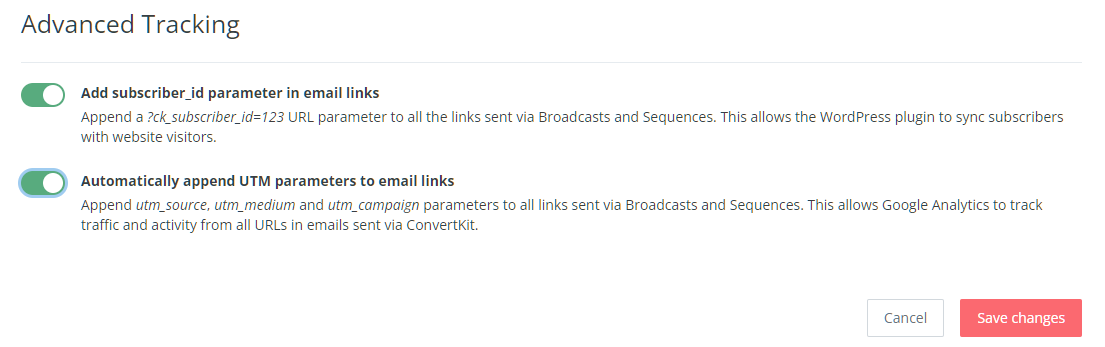
That will tell SegMetrics who is visiting the page, even if they're on a different device or have opted in before you had SegMetrics.
Set Up Landing Page Tracking
If you are using Kit's native landing pages, you'll want to install the tracking pixel on those pages as well. Since Kit's landing pages restrict which tracking pixels are available on the landing pages, you'll need to use Google Tag Manager to install the pixel.
- Click Settings from the landing page editor toolbar across the top of the page
- Click Settings and choose the Advanced t
- Toggle on "Send subscriber to thank you page"
-
Click Save
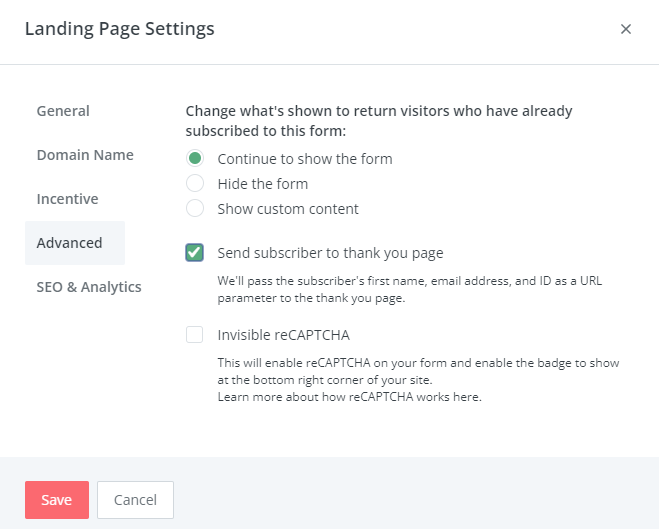
- From the Settings modal, click SEO & Analytics on the le
- Click Google Tag Manager and enter your Google Tag Manager ID in the field provide
- If you want more info on how to input SegMetrics tracking within GTM so the above steps work, please see this article.
SegMetrics Reports for Keap Data
Once your Keap data is imported, use these specific reports to analyze different aspects of your marketing:
For New Leads
Acquisition Report - View and analyze new lead generation:
- Navigate to Acquisition in SegMetrics
- Create new acquisition report
- Filter by date range and lead sources
- Add filters for campaigns, UTM parameters, or contact sources
For Tag and List Analysis
Nurture Report - Track tag-based and list performance:
- Navigate to Nurture in SegMetrics
- Create new nurture report
- Filter by specific tags or lists from Keap
- Analyze performance by tag segments and list memberships
For Email and Page Engagement
Engagement Report - Analyze funnel page and email metrics:
- Navigate to Engagement in SegMetrics
- View email performance and page engagement metrics
- Track click-through rates and page interactions
- Monitor funnel page performance and conversion rates
For Revenue Analysis
Orders Report - Analyze customer purchases and revenue:
- Navigate to Orders in SegMetrics
- Create new orders report
- Filter by Keap customers and date ranges
- Analyze purchase patterns and revenue attribution
For Subscription Business
Subscriptions Report - Track subscription metrics (if applicable):
- Navigate to Subscriptions in SegMetrics
- Monitor recurring revenue and subscription performance
- Track churn rates and subscription lifecycle metrics
- Analyze subscription cohorts and retention
Frequently Asked Questions
Q: How long does it take for Kit data to sync with SegMetrics?
A: Initial sync begins immediately after connection. All historical data from your Kit account is imported during the first sync. This typically takes a few hours. Moving forward sync times depend on your plan. Standard plan is sync every 8 hours. Kit data is synced in UTC, and SegMetrics reports on your data based on the timezone you set in your Account Settings.
Q: What data is imported from Kit?
A: SegMetrics imports your contacts, custom fields, tags, email campaign data, sequences, and e-commerce data. If you're using Kit's payment tracking, payment data is integrated automatically. For external payment processors, we match data using email addresses.
Q: Do I need to install tracking pixels to get Kit data?
A: You do not need to create a Tracking Link for SegMetrics to track website visitors - it will still gather the UTM data. However, tracking pixels provide more detailed information about exactly which links subscribers clicked for ads, email broadcasts, or campaigns.
Q: Can I track sales from client invoices and cart sales in Kit?
A: Yes, we use the e-commerce data that comes through Kit's integrations. For more complex invoice tracking, consider using funnel reports where you can set out each step a client takes through the process (sales call, signup, invoice, payments, etc).
Q: What permissions do I need in Kit to connect to SegMetrics?
A: You'll need to have permissions as an account owner or admin in Kit to connect or reconnect the integration. This ensures you have access to the API credentials needed for the connection.
Still need help? Contact us at: support@segmetrics.io
Full Transcription:
Hey! So you're using Kit for your email marketing—that's awesome, especially if you're a creator or coach. Kit makes email marketing simple and powerful, and a lot of you might already be familiar with Kit Insights for basic email attribution.
But here's the thing: what if you want the complete picture? What if you need to see how email fits into your entire marketing strategy—your ads, your funnels, your traffic sources, or even going beyond email insights? Today I'm going to show you how connecting Kit to the full version of SegMetrics gives you that total visibility.
Now, some of you might be using Kit Insights, which gives you basic email attribution right inside Kit. That's really helpful for seeing which emails are generating revenue.
But here's the reality—email is just one piece of your marketing, right? You're probably running ads, creating content, posting on social, maybe doing webinars or challenges. And the big question is: how does it all work together? Which traffic sources bring in your best subscribers? How long does it take before someone buys? What's the complete customer journey?That's where connecting Kit to the full version of SegMetrics becomes incredibly powerful.
SegMetrics gives you full attribution and visibility across your entire marketing ecosystem. Email, ads, traffic sources, funnels—everything in one place. Now you can make smarter decisions about where to invest your time and budget.
Alright, let’s jump into SegMetrics to see how this all works.
Setting up the integration is super easy. Head to your Integrations page in SegMetrics, find Kit and click connect.
It will have you login to Kit if you aren’t already, authorize the Kit account to connect to SegMetrics. Next, if all of your products and order processing takes place inside of Kit, be sure to enable the Import payment data from Kit setting. And just like that, your Kit data starts flowing in. All your subscribers, tags, custom fields, and purchases—everything syncs automatically in the background.
Now Let me walk you through some powerful features.
Let's jump over to the Acquisition Dashboard. This is where you can see exactly which channels are bringing in the most Kit subscribers. Check out the Top Sources widget right here. See how Paid traffic brought in around 2,900 visitors and converted 1,232 of them into new leads on your Kit list? That's solid. But look at the revenue column—that Paid channel generated nearly $120K in revenue. Compare that to AI Search—1,354 visitors, 424 new leads, but only $42K in revenue. Now you can see which channels aren't just growing your list, but actually bringing in subscribers who become paying customers.
So what do you do with this info? Simple—double down on what's working. In this case, your Paid channel is crushing it, so maybe it's time to increase that ad budget. And those channels with zero revenue? Either optimize them or cut them loose and reallocate that energy to your winners.
Now let's check out the Engagement Dashboard. This is where you can see how your Kit subscribers are actually interacting with your content—emails, website pages, all of it. Look at the top metrics here. You've got 7,501 total contacts, and 3,268 of them are actively engaged—that's about a 44% engagement rate. Your purchase rate is sitting at 5%, and the average engagement value is almost $50 per subscriber. This gives you a snapshot of how healthy your list really is.
Scroll down and you'll see the Email Performance section showing which specific email campaigns are driving the most leads and revenue. In this example, the "timerunningout" campaign brought in 47 leads and generated $6,500. Compare that to "Lastchance" with 46 leads and about double in revenue. And check out the Web Performance widget on the right—you can see which pages your subscribers are visiting and how much revenue those pages are driving. Your homepage brought in 3,186 leads and $155K in revenue. That's powerful stuff.
So what do you do with this? Focus your energy on creating more content like what's already working. If certain email campaigns or pages are driving serious engagement and revenue, do more of that. And if something's struggling to produce revenue? It might be time to rethink your messaging or offers.
Now let's dive into the Advertising Report. This is where you can see the direct link between your paid ads and the Kit subscribers and customers they're bringing in. Check out the top metrics—you've spent $146K in ad spend, brought in 1,472 new leads at about $99 per lead, converted 165 of them into customers, and generated $156K in revenue. That's a 107% return on ad spend, which means you're profitable overall.
But here's where it gets really powerful—scroll down to the Top Sources widget and you can break down performance by individual campaigns. Look at the Retargeting campaign: $31K spend, 891 new leads, 91 customers, and $100K in revenue with a 318% ROAS. That's a winner. Compare that to YouTube Retargeting—$33K spend but only $11K in revenue with a 34% ROAS. Ouch, that one's losing money.
This tells you that you should scale up what's working and cut what's not. In this case, your Retargeting campaign is crushing it, so throw more budget at it. YouTube Retargeting? Either fix the targeting and creative or shut it down and reallocate that budget to your profitable campaigns. That's how you maximize your ad ROI.
Here's another really powerful use case—A/B testing your funnels using Kit tags. Let's say you're testing two different funnel paths, each with its own email nurture sequence. You tag subscribers in Funnel A with "seq-eg: Funnel A" and Funnel B subscribers with "seq-eg: Funnel B" inside of Kit.
Now jump over to the Orders Report and apply those tags as a filter to the dashboard. Now, check out the Customer Segments widget. Look at this—Funnel A brought in 195 orders and generated $147K in revenue. Funnel B? Only 26 orders and $20K in revenue. Clear winner, right? Funnel A is crushing it.
But here's where it gets even better—look at the Top Order Sources widget on the right. You can see which channels first brought those subscribers into your funnels. Paid ads brought in 155 orders worth $119K, while AI Search brought in 56 orders at $42K. This tells you not only which funnel performs better, but also which traffic sources work best to get your subscribers into your funnels.
So what do you do here? Double down on Funnel A and scale up the channels feeding it. Kill or rework Funnel B. That's data-driven optimization at its finest.
With Kit and SegMetrics working together, you've got the complete analytics picture. Kit handles your email marketing beautifully, and SegMetrics shows you exactly how email fits into your bigger marketing strategy.
You'll know which channels are bringing in your best subscribers, how long your sales cycle really is, and where to focus your efforts to grow faster and more profitably. That's the power of seeing everything in one place.
Well, that wraps things up. We've got a lot more videos on the channel and new episodes coming to help you optimize your marketing with SegMetrics. Don't forget to like and subscribe. Thanks for watching and I’ll see you next time.